





Choosing an email verification tool isn’t really about finding the provider with the longest feature list. It’s about finding one that produces trustworthy results on your data, fits the way your team works and can still support you when verification volume or technical requirements grow.
The main buying criteria are verification accuracy, treatment of catch-all and uncertain addresses, bulk processing capacity, real-time API performance, result depth, integrations, security, reliability and total cost. The weight of each criterion changes depending on where verification sits in your workflow.
A marketing team cleaning campaign lists has different requirements from a SaaS platform checking signups in real time. An agency processing client databases has different priorities again.
This guide gives you a repeatable framework for evaluating providers rather than simply comparing feature pages.
If you’re looking for a primer on how the technology itself works, start with Bouncer’s email verification guide. Here, we’ll focus on how to evaluate, test and buy an email verification service.
Email verification buyer’s guide in 30 seconds
| If you need… | Prioritise… |
| Occasional list cleaning | Accuracy, bulk workflow, transparent pricing |
| Large databases | Throughput, batch limits, effective cost |
| Signup verification | API behaviour, latency, fallback logic |
| Developer integration | API documentation, errors, sandbox, SDK fit |
| Enterprise procurement | Security, data handling, scale, reliability |
| Agency workflows | Bulk processing, repeatability, integrations, predictable cost |
There is no universally best email verification tool for every organisation. There can, however, be a best fit for a specific workflow.
The trick is defining that workflow before you start comparing vendors.
How should you choose an email verification tool?
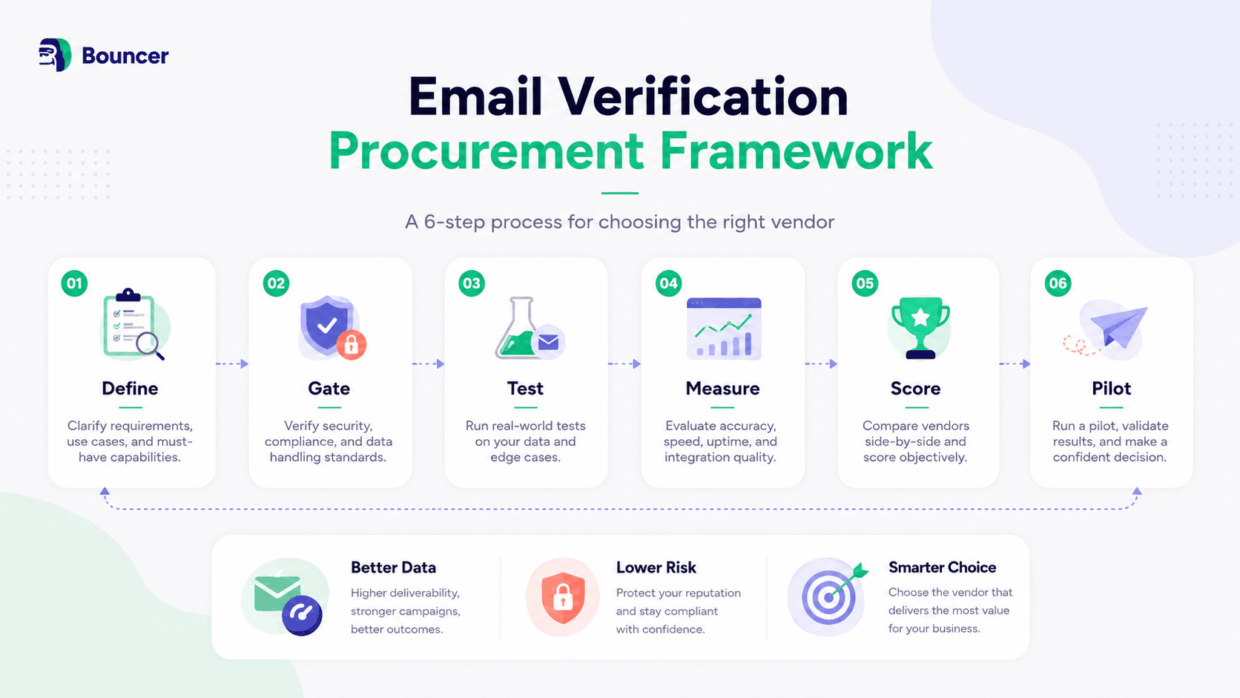
A good email verification buying process should separate requirements from marketing claims. Define what verification needs to accomplish first, remove providers that fail mandatory requirements, test the remaining options under comparable conditions and only then score them.
A useful six-step framework is:
Define → Gate → Test → Measure → Score → Pilot
- Define what your organisation actually needs from verification.
- Gate providers against requirements that cannot be compromised.
- Test the remaining vendors using the same representative dataset.
- Measure accuracy, uncertainty, performance, workflow fit and cost.
- Score each provider using criteria weighted for your use case.
- Pilot the strongest candidate inside a real workflow before rolling it out fully.
The order matters.
If you create a shortlist before writing down your requirements, it becomes easy to rationalise whichever product already looks attractive. A polished interface or familiar brand name can start influencing the decision before anyone has checked throughput, data-location requirements or what happens when the API times out.
Buyer best practice: write down the workflow and your hard requirements before opening comparison pages.
What do you actually need email verification to do?
The right email verification service depends on where verification enters your process and what happens when it returns the wrong result, a slow result or no confident result at all.
Email verification may happen before a campaign, after a database import, when a new lead reaches the CRM, during account signup, inside an ecommerce form or continuously through an API.
Those situations don’t carry the same operational risk.
If an overnight cleaning job takes 20 minutes longer than planned, the impact may be negligible. If verification sits directly inside customer registration, delayed responses can affect the product experience. If you process several million records for customers, throughput and predictable bulk behaviour can become more important than the UI.
A simple requirements matrix helps:
| Use case | Accuracy | Bulk | Real-time API | Integrations | Security | Scale |
| Email marketing | Critical | High | Low | High | Medium | Medium |
| Outbound sales | Critical | High | Medium | High | Medium | High |
| SaaS/product | Critical | Medium | Critical | Medium | High | High |
| Enterprise | Critical | High | High | High | Critical | Critical |
| Agency | Critical | Critical | Medium | High | High | High |
| Data platform | Critical | High | Critical | Medium | High | Critical |
These aren’t fixed scores. They are a starting point.
A newsletter publisher might initially need nothing beyond quarterly list cleaning. Add verification to the signup form later and real-time API performance suddenly becomes a core requirement.
Likewise, a company can start with manual bulk verification and eventually need scheduled hygiene or direct CRM automation.
Bouncer has a separate SaaS email verification buyer’s guide for product teams that need to go deeper into signup and application workflows.
Start with the failure scenario
One useful way to prioritise requirements is to ask:
What breaks when verification doesn’t work as expected?
If the answer is “the marketing campaign starts an hour later”, you probably don’t need to design procurement around millisecond response times.
If the answer is “new customers can’t create accounts”, reliability and fallback logic deserve much more weight.
If the answer is “we may send to thousands of bad addresses”, classification accuracy should dominate the decision.
That single question can remove a surprising amount of procurement noise.
Which email verification requirements should be non-negotiable?
Some evaluation criteria should never be averaged into a score. If a requirement determines whether the system can legally, technically or commercially be used, treat it as a pass/fail gate.
For example, excellent accuracy doesn’t compensate for failing a mandatory data-location policy. Likewise, excellent pricing doesn’t matter if the provider cannot process the required workload.
| Area | Example hard requirement |
| Volume | Must process X records within Y hours |
| API | Real-time verification is mandatory |
| Integration | Must work with required CRM or ESP |
| Developer | Required integration route must fit existing stack |
| Security | Must pass internal privacy/security review |
| Data | Required residency or retention rules |
| Commercial | Must remain below effective-cost ceiling |
Keep this list intentionally short.
If you mark 40 things as mandatory, you are effectively creating another scoring system.
The useful hard gates are the ones that would genuinely make procurement stop.
Procurement rule
If a provider fails a real non-negotiable, don’t let unrelated strengths compensate for it later.
That principle becomes especially important once you introduce a weighted scorecard. A vendor can score 92/100 and still be the wrong purchase if the missing eight points represent something the organisation cannot compromise on.
How should you evaluate email verification accuracy?
Accuracy is usually the most important buying criterion and one of the easiest to evaluate poorly.
A provider saying “99% accurate” tells you very little unless you also understand what was measured, how difficult addresses were represented, how uncertain results were treated and which kinds of errors make up the remaining percentage.
Real email lists contain straightforward addresses alongside stale accounts, catch-all domains, disposable inboxes, full mailboxes, role addresses, invalid domains, greylisting and servers that deliberately make mailbox verification difficult.
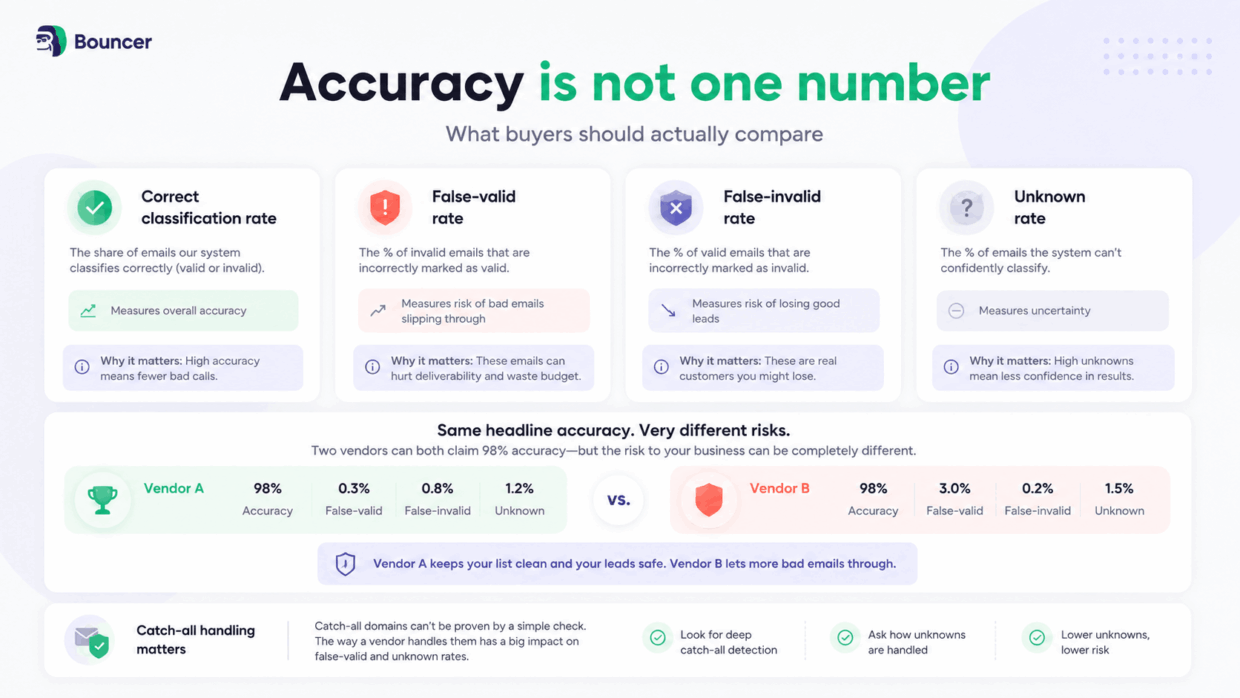
That is why accuracy isn’t one number.
Compare four outcomes separately
| Metric | What it tells you |
| Correct classification rate | How often known outcomes are classified correctly |
| False-valid rate | How often bad addresses are incorrectly accepted |
| False-invalid rate | How often working addresses are incorrectly rejected |
| Unknown rate | How often no confident classification can be produced |
The distinction between false-valid and false-invalid results is particularly important.
A false-valid classification means a bad address gets treated as safe. Depending on the workflow, that may lead to a bounce, wasted outreach or poor data quality.
A false-invalid classification has the opposite problem. A real address may be discarded even though the person behind it could have become a customer, subscriber or lead.
Two vendors can therefore advertise similar headline accuracy while creating very different business risk.
Unknown doesn’t automatically mean poor verification
An unknown result can be frustrating because it does not provide an immediate yes/no answer. It is not automatically evidence that the verification system performed badly.
Sometimes the receiving infrastructure does not expose enough information for a defensible classification.
A verifier could reduce its reported unknown rate simply by being more aggressive and forcing uncertain results into valid or invalid categories. The dashboard would look more decisive, but the additional certainty might not be real.
The better question is:
What happens to uncertainty that isn’t labelled unknown?
Bouncer’s current Guarantee states accuracy above 99%, 98% coverage and around 2% unknown results. It also states that Bouncer deliberately biases against false negatives rather than risking the loss of a real contact and offers a refund for qualifying addresses marked deliverable that bounce for an objective reason within 72 hours.
The broader procurement lesson is more important than the individual figure:
look for an accuracy methodology you can inspect.
Test difficult addresses deliberately
A benchmark made entirely from easy-to-verify addresses will hide many of the differences between providers.
Include normal production data, but make sure difficult cases are represented too.
| Address type | What it helps expose |
| Known valid | Baseline classification |
| Known invalid | Bounce-risk detection |
| Historical hard bounce | Stale-address handling |
| Catch-all | Coverage and uncertainty |
| Disposable | Temporary-address detection |
| Role account | Classification depth |
| Full mailbox | Account-state handling |
| Disabled mailbox | Stale-account detection |
| Invalid domain | Domain/DNS checks |
| Greylisted infrastructure | Retry behaviour |
| Google Workspace | Common B2B infrastructure |
| Microsoft 365 | Common B2B infrastructure |
| Niche/local provider | Long-tail coverage |
The purpose isn’t to manufacture the most difficult test imaginable. It is to create a dataset that resembles the problems the provider will encounter after purchase.
How should an email verification tool handle catch-all and risky addresses?
Catch-all domains deserve separate evaluation because a basic mailbox check may not establish whether an individual recipient actually exists.
A catch-all domain can accept mail for many or all addresses at that domain. That means a receiving server may appear to accept an address even when the specific mailbox cannot be confidently proven.
So don’t let:
“We support catch-all verification”
remain a yes/no feature.
Ask what support actually means.
- Does the vendor identify that a domain is catch-all and stop there?
- Does it attempt to resolve individual mailboxes?
- Which mail-provider infrastructures can it resolve?
- How does it classify addresses when mailbox-level confidence remains low?
- Does catch-all treatment affect the vendor’s unknown or risky rates?
Bouncer’s current verification page says it resolves catch-all addresses on Google and Microsoft infrastructure and reports fewer than 2% unknown results overall. The same page states that Bouncer has verified more than five billion addresses to date.
Risky results need business rules
Not every uncertain address should automatically be deleted.
Your organisation may choose to:
- send normally,
- send with additional caution,
- suppress the record,
- quarantine it,
- retry verification,
- require another qualification signal.
The right action depends on the use case.
A SaaS company might reject a disposable email during account creation while allowing a role account.
An outbound sales team might keep catch-all corporate addresses but place them in a different sending workflow.
A data provider may expose the raw result and allow its own customer to decide.
The best verification output gives you enough information to make those decisions consistently.
Bouncer’s Batch API results, for example, can include status and reason plus domain properties such as accept-all, disposable and free-provider flags, account-level signals including role, disabled and full-mailbox status, DNS information, provider, score and toxicity fields.
What should you look for in bulk and batch verification?
Bulk email verification should be evaluated as an operational workflow, not simply as the existence of a CSV upload button.
At small scale, interface usability and a clean export may be enough. At higher volume, batch size, processing capacity, queue behaviour, retries and result recovery become much more important.
| Criterion | Question to ask |
| Maximum batch | How many records can one batch contain? |
| Recommended size | Which batch size performs best? |
| Throughput | How many addresses can be processed per hour? |
| Concurrency | Can multiple jobs operate simultaneously? |
| Queueing | What happens when large batches compete? |
| Progress | Can processing state be queried? |
| Retries | Which verification attempts are retried? |
| Partial results | Can usable results be recovered after interruption? |
| Duplicates | Are duplicate addresses processed or charged? |
| Unknowns | Are uncertain results charged? |
| Input | Which formats are supported? |
| Output | Can full results be exported? |
Don’t compare speed without context
“Fast verification” isn’t a particularly useful specification.
Ask:
Fast at what volume?
A provider that processes a 5,000-address list quickly may behave differently when several million addresses enter a queue.
It also matters how the provider achieves the result. More time can allow retries and deeper verification of difficult infrastructure.
Bouncer’s standard Batch API documentation currently states that a batch can contain up to 100,000 addresses, with 1,000–10,000 recommended. Default customer settings support roughly 100,000–200,000 addresses per hour and the documentation notes that configuration can be adjusted for higher-throughput cases. Batch jobs can be tracked through the status endpoint or completed through callbacks.
The same documentation explicitly positions Batch as the method to use when verification quality and a low unknown rate are priorities.
For a buyer, that’s useful because it reveals a trade-off rather than pretending every workflow produces identical performance.
What makes a good email verification API?
A good email verification API needs to do more than return an email status. Buyers should evaluate the API’s behaviour under success, uncertainty, high volume and failure.
The important questions include result structure, rate limits, timeout rules, retry logic, error handling, batch options and testing facilities.
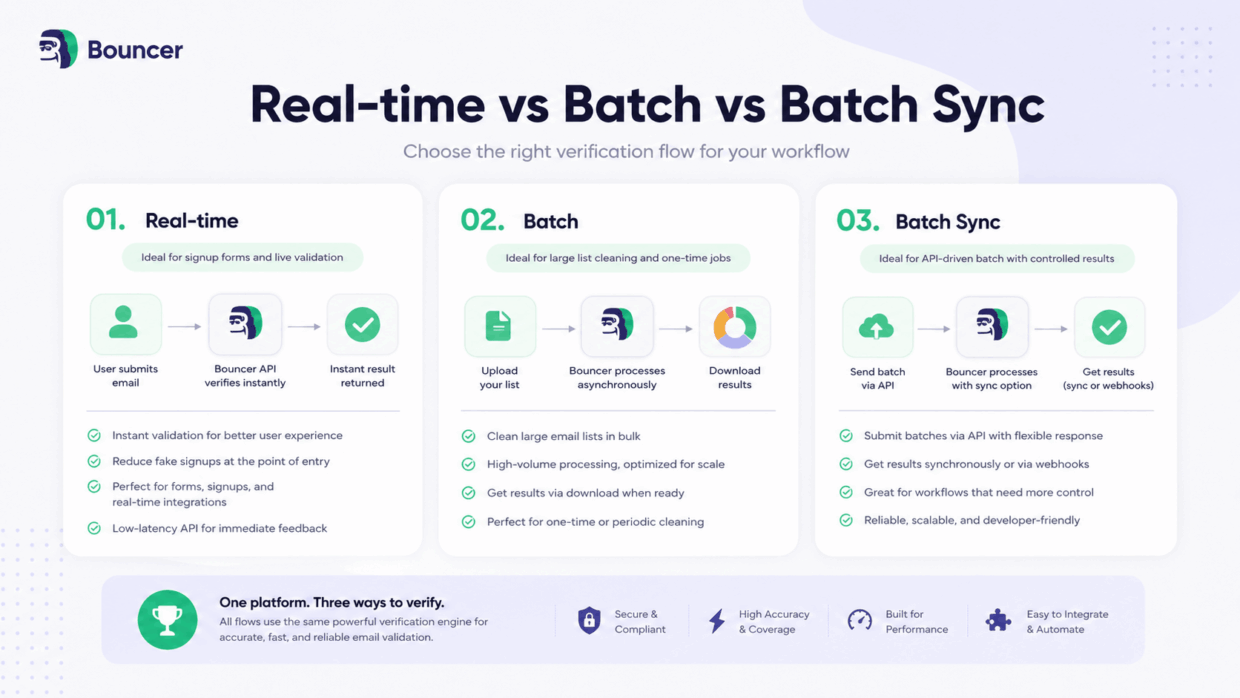
Real-time verification and batch verification solve different problems
Real-time verification is most useful when a decision needs to happen close to data entry.
Typical examples include:
signup → verification → account creation
lead form → verification → CRM
checkout → verification → continue
Batch verification works differently:
database → verification queue → results → action
It usually suits large datasets where processing can happen asynchronously.
Bouncer’s API currently exposes Real-Time, asynchronous Batch and Batch Synchronous flows.
Measure the slow requests too
Average API latency can hide the experience that actually hurts users.
For real-time verification, ask about:
| Requirement | Why it matters |
| Typical response time | Normal user experience |
| Timeout ceiling | Worst-case waiting |
| Rate limit | Peak traffic |
| Retry behaviour | Reliability |
| Greylisting behaviour | Delayed answers |
| Unknown response | Fallback policy |
| 4xx errors | Request/client problems |
| 5xx errors | Provider/service problems |
Bouncer’s current Real-Time API uses a default ten-second verification timeout, with a maximum of 30 seconds, and a default limit of 1,000 requests per minute. Its documentation also says Real-Time verification typically produces around 5% more unknown results than the fuller Batch process because some addresses require more time or retries.
That’s exactly the type of trade-off a useful vendor should expose.
Speed and verification depth are not always the same objective.
Decide what your application does after a timeout
Procurement should not stop at:
“Does the API have a timeout?”
You also need an application policy.
If verification cannot complete, does the user wait?
Does signup continue while verification happens later?
Does the record enter a quarantine queue?
Does the application retry?
That behaviour is partly the vendor’s responsibility and partly yours. A good API gives engineering teams enough information to build a predictable policy.
Batch Sync can fill the middle ground
For workflows that need batch processing through an API but prefer a synchronous-style integration model, a hybrid endpoint can be useful.
Bouncer’s Batch Sync documentation currently allows up to 10,000 addresses per request, lists a default capacity of around 100,000 verifications per hour and applies a default limit of 100 requests per minute.
This isn’t automatically the best endpoint. It is simply another architecture to evaluate against the workflow.
Does SDK support matter when choosing an email verifier?
SDK availability can make integration easier, but counting SDK logos is a weak developer-experience metric.
What matters is whether the vendor supports your stack well and whether the API itself remains understandable without a wrapper.
| Developer criterion | What good looks like |
| API documentation | Clear requests, responses and examples |
| REST API | Stable, predictable interface |
| SDK | Useful for your actual stack |
| Maintenance | Clear ownership and updates |
| Errors | Documented failure states |
| Sandbox | Reproducible outcomes |
| Versioning | Predictable changes |
| Support | Technical escalation path |
Bouncer’s public integration documentation currently references an official Java client library. For other stacks, the REST API remains the stack-independent integration route.
That illustrates an important procurement principle:
API available ≠ great developer experience, and many SDKs ≠ great developer experience either.
A strong REST API with good docs and predictable errors can be more useful than a poorly maintained first-party package.
Why should a sandbox be part of API evaluation?
A sandbox allows teams to test application logic without spending credits or trying to manufacture production edge cases.
This becomes especially valuable when testing:
- invalid addresses,
- disposable addresses,
- catch-all behaviour,
- unknown results,
- fallback logic.
Bouncer provides free sandbox addresses covering deliverable, free-provider, disposable, accept-all, undeliverable, unknown and other outcomes. Its sandbox also supports + suffixes to generate additional unique test addresses.
A sandbox doesn’t prove production accuracy.
It proves something different: that your application can reliably handle the range of responses the verification system may return.
You need both tests.
What should an email verification result actually tell you?
A binary valid/invalid response is easy to understand but often too blunt for a serious workflow.
A useful result should help a person or system determine what happens next.
| Signal | Example action |
| Deliverable | Accept or send |
| Undeliverable | Suppress or reject |
| Risky | Apply internal policy |
| Unknown | Retry, quarantine or review |
| Catch-all | Use catch-all policy |
| Disposable | Reject or segment |
| Role-based | Apply use-case rules |
| Full mailbox | Retry later |
| Toxic/risky signal | Apply stricter rules |
There is no universal action map.
A SaaS business may reject temporary addresses at signup.
A marketing team may keep them in an existing customer database but remove them from campaign segments.
A sales organisation may keep catch-all addresses while applying more conservative sending rules.
The result needs to contain enough context for the business to make that distinction.
Bouncer’s documented Batch output supports four main statuses — deliverable, risky, undeliverable and unknown — alongside reason codes and additional domain, account, DNS, provider, scoring and toxicity information.
Rich data is useful only when it becomes action
Twenty fields are not automatically better than five.
The test is:
Can your team translate the output into a repeatable rule?
If nobody knows what to do with a particular field, it may add complexity rather than value.
A good procurement test should therefore compare not only how much data each provider returns but how easily that data becomes:
- CRM segmentation,
- signup rules,
- suppression logic,
- retry logic,
- reporting,
- or automation.
How should you evaluate integrations and workflow fit?
Integration coverage should be measured by work removed, not logos accumulated.
Start with where the email data lives, then follow what happens before and after verification.
For a marketing team:
CRM → verify → classify → campaign segment
For a product:
signup → real-time verification → decision logic → account
For recurring database hygiene:
CRM → scheduled verification → keep/suppress/quarantine → update records
The strongest integration is the one that reduces repetitive imports, exports and manual decisions in that chain.
Native integration or API?
Native integrations are attractive when they match your workflow closely and your team wants to avoid engineering work.
An API becomes more attractive when:
- verification is part of a custom product,
- several internal systems need the same verification layer,
- custom logic is required,
- unusual scale is involved,
- native integrations hide data you need.
Neither route is inherently superior.
Choose the least complicated integration that still gives the organisation enough control.
Bouncer’s AutoClean currently supports scheduled and recurring list hygiene, checking new contacts automatically and allowing keep, suppress and quarantine rules based on verification results. The product page currently lists integrations including HubSpot, User.com, Klaviyo, Brevo, Mailchimp and Inboxroad for AutoClean workflows.
That is a different requirement from one-time bulk cleaning, so it should be scored only when recurring hygiene actually matters.
What security and privacy requirements should you check?
Email verification frequently involves customer, prospect, subscriber or employee data. That means a verification provider may need to pass the same privacy and security review as other systems that process personal data.
Don’t reduce that review to a row of certification logos.
Establish what actually happens to the data.
| Area | What to establish |
| Data location | Where addresses are processed and stored |
| Retention | How long addresses/results remain |
| Deletion | How data is removed permanently |
| Encryption | Protection in transit and at rest |
| Authentication | How API/account access works |
| Subprocessors | Which third parties process data |
| Compliance | Relevant certifications and agreements |
| Incident handling | What happens after an incident |
| Account controls | Appropriate access restrictions |
| Reuse | Whether uploaded data is repurposed |
Bouncer currently states that its email verification product is GDPR compliant, SOC 2 certified and stores verification data in the EU.
Its dedicated GDPR page says uploaded addresses are hashed throughout the system except the layer used to retrieve results, users can permanently delete verification results on demand and results are otherwise erased after 60 days. It also states that its data centres are in EU territory.
For procurement, the exact rule is straightforward:
confirm that the provider’s real policy meets your organisation’s policy.
How reliable does an email verification provider need to be?
Reliability requirements depend on how deeply verification is embedded into the business.
A temporary service issue during quarterly list cleaning may be inconvenient.
The same issue can become customer-facing when verification participates in signup.
That makes reliability partly a software question and partly an architecture question.
Buyers should ask about availability, service health, rate-limit behaviour, predictable errors and technical support.
Engineering teams should also decide how the surrounding application behaves when verification is temporarily unavailable.
Reliability isn’t just uptime
A provider can have excellent availability and still create operational problems if failure states are ambiguous.
Good API behaviour should make it possible to distinguish:
the address is bad
from
the verification attempt failed
from
we cannot confidently classify the address yet
Those situations should not automatically trigger the same action.
Bouncer’s integration guidance documents standard HTTP response handling and separates successful responses, client errors and server-side failures.
That kind of clarity is valuable because it lets developers implement predictable retries rather than treating every failure as an invalid email address.
How should you compare email verification pricing?
The price per 1,000 addresses is only the visible part of verification cost.
A cheaper headline rate can become more expensive when you add charges for unknowns, duplicate processing, expiring credits, minimum commitments, repeated verification or the engineering work required to maintain a fragile integration.
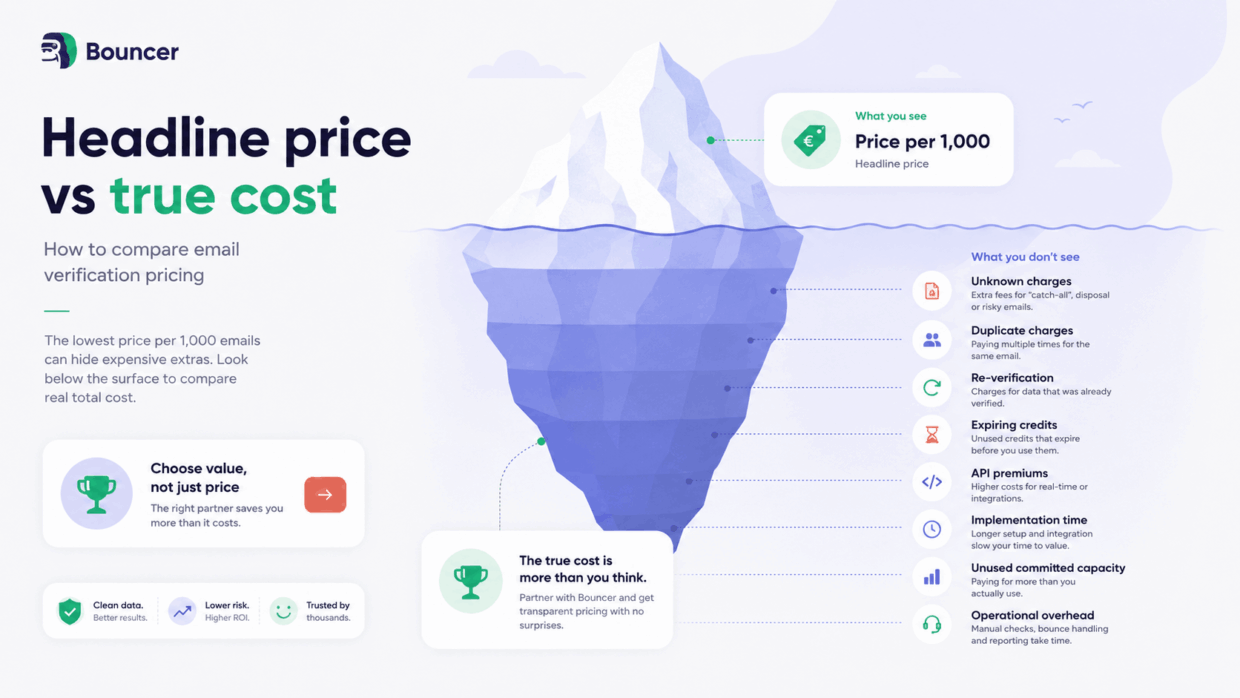
Calculate total verification cost
A practical formula is:
Total verification cost = verification credits
- paid unknown results
- duplicate charges
- re-verification
- API premiums
- unused committed capacity
- implementation cost
- ongoing operational cost
Then calculate:
Effective cost per usable result = total verification cost ÷ actionable verification results
This figure is more informative than sticker price because it reflects what the organisation actually receives from the spend.
Compare more than one volume
Model at least three scenarios.
Current volume tells you what procurement costs today.
Expected volume shows what happens after normal growth.
Stress volume models a migration, major campaign, acquisition or unusual database import.
Pricing curves aren’t always linear. A provider that appears expensive at 10,000 checks can become competitive at one million, or vice versa.
Bouncer’s current pay-as-you-go pricing starts at $8 for 1,000 credits and lists $2,000 for one million credits. Its pricing page states that on-demand verification credits don’t expire and that duplicates within a list and unknown results are not charged.
Pricing is inherently changeable, so link readers directly to Bouncer pricing rather than freezing every pricing tier into the buyer’s guide.
How do you test email verification vendors before buying?
The best vendor comparison is usually the one you run yourself.
Take a representative dataset, verify the same addresses with every shortlisted provider within a comparable time window and examine both classification quality and operational behaviour.
This turns vendor evaluation from:
“Which website sounds most convincing?”
into:
“Which provider performed best on the workload we actually need?”
Step 1: Build a representative dataset
Start with real addresses from the environment where verification will operate.
Then deliberately include enough difficult examples to reveal meaningful differences.
An example testing mix could be:
| Segment | Example share |
| Normal business addresses | 40% |
| Known invalid | 15% |
| Historical bounces | 10% |
| Catch-all | 10% |
| Google Workspace edge cases | 5% |
| Microsoft 365 edge cases | 5% |
| Disposable | 5% |
| Role accounts | 5% |
| Other difficult cases | 5% |
These percentages are a testing template, not an industry benchmark.
Change them to match your own database.
A consumer ecommerce business dominated by Gmail addresses should not use the same sample composition as a B2B data provider.
Step 2: Freeze the dataset
Every vendor gets the same addresses.
Try to perform the checks within a similar period too.
Mailbox availability and receiving-server behaviour can change, so comparing Provider A today with Provider B two months later introduces another variable.
Same input. Similar timing.
Step 3: Save raw results
Don’t immediately reduce every vendor response to your own valid and invalid fields.
Keep the native result first.
You may discover that one provider gives useful information another does not, even when the top-level classification is identical.
Step 4: Measure classification quality
Where ground truth exists, calculate:
False-valid rate
known bad addresses classified as safe ÷ all addresses classified as safe
False-invalid rate
known working addresses classified as invalid ÷ all addresses classified as invalid
Unknown rate
unknown results ÷ total addresses verified
Coverage
addresses receiving usable classifications ÷ total addresses verified
Be careful with the denominator.
Two vendors can describe similar metrics with different definitions.
Step 5: Measure operational performance
Classification isn’t the whole test.
Record:
Throughput — how much data was processed over time.
API latency — particularly if verification is user-facing.
Effective cost — what the actual test cost after all charging rules.
Implementation effort — how much engineering or operator time was required.
Result usability — how easily your team can convert outputs into rules.
Step 6: Investigate disagreements
The most valuable records may be the ones where vendors don’t agree.
If Provider A says deliverable, Provider B says risky and Provider C says unknown, investigate that address.
Those disagreements expose differences in how the systems deal with uncertainty.
A benchmark where all tools agree on 900 easy addresses and disagree on 100 difficult ones should focus attention on those 100.
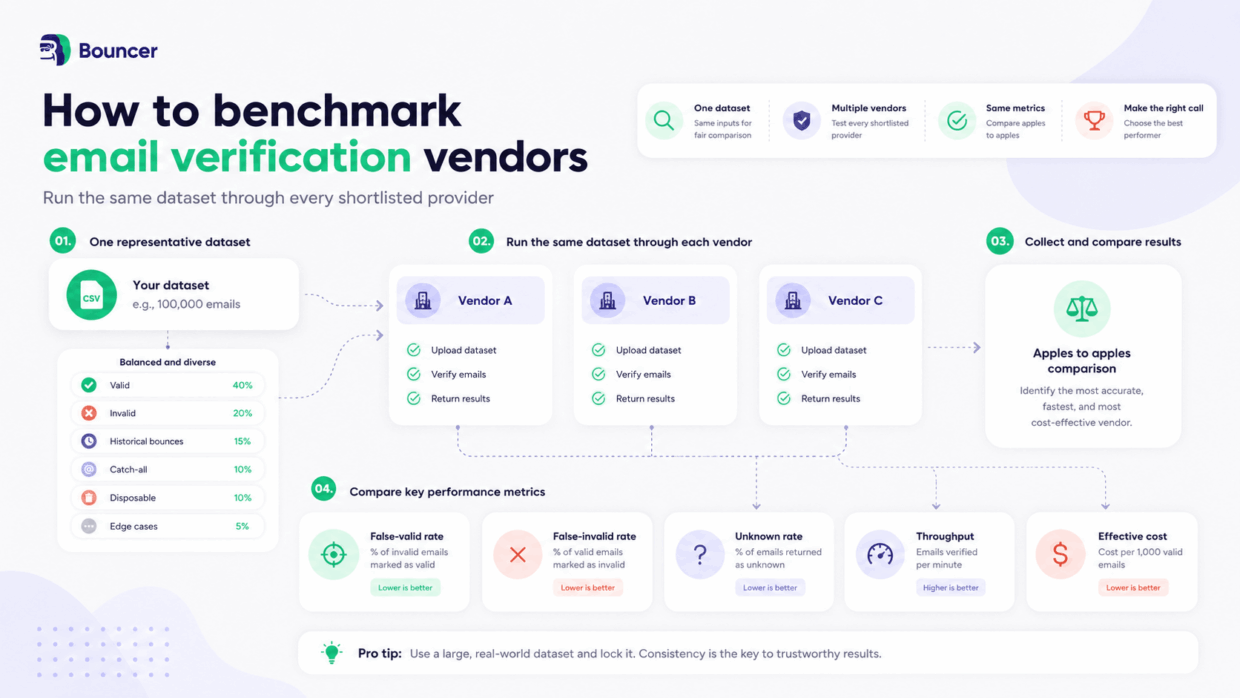
Buyer best practice
Same data. Same time window. Same metrics.
If any of those changes between vendors, the comparison becomes harder to trust.
Email Verification Procurement Scorecard
A controlled test gives you evidence. A weighted scorecard turns that evidence into a decision.
Not every criterion deserves equal weight.
A SaaS application may care more about real-time API behaviour than native marketing integrations. An agency processing client lists may care more about bulk scalability, workflow repeatability and predictable pricing.
Use the following as a default and change the weighting before evaluating vendors.
Email Verification Procurement Scorecard
Vendor: ____________________
Reviewer: ____________________
Date: ____________________
| Criterion | Weight | Vendor score | Weighted score |
|---|---|---|---|
| Verification accuracy | 18% | ___ / 5 | ___ |
| Catch-all handling | 8% | ___ / 5 | ___ |
| Bulk scalability | 8% | ___ / 5 | ___ |
| API and real-time performance | 12% | ___ / 5 | ___ |
| Developer experience | 6% | ___ / 5 | ___ |
| Result depth and usability | 7% | ___ / 5 | ___ |
| Integrations and workflow fit | 6% | ___ / 5 | ___ |
| Security and privacy | 10% | ___ / 5 | ___ |
| Reliability | 7% | ___ / 5 | ___ |
| Pricing and TCO | 8% | ___ / 5 | ___ |
| Support | 5% | ___ / 5 | ___ |
| Future scalability | 5% | ___ / 5 | ___ |
| Total | 100% | ___ / 100 |
Scoring:
1 = Poor
2 = Material limitations
3 = Adequate
4 = Strong
5 = Excellent for your requirements
Formula: Weight × vendor score ÷ 5 = weighted score.
Critical procurement gates
☐ Required API capability is missing
☐ Required throughput is unavailable
☐ Security or privacy requirement failed
☐ Required integration is unavailable
☐ Required data location is unavailable
Decision rule: a vendor that fails a mandatory requirement should not win solely because it receives the highest weighted score.
Don’t let the number replace judgment
The scorecard isn’t a mathematical proof that one provider is best.
Its job is to make your assumptions visible.
If two stakeholders disagree about a vendor, the scorecard helps expose why.
One may consider API reliability critical while another has given it only 5% weight.
That is a useful procurement conversation.
What red flags should you look for in an email verification vendor?
The biggest red flags aren’t always missing features. More often, they are important claims that cannot be evaluated.
A vendor doesn’t need to be perfect. It should, however, give buyers enough information to understand limitations, uncertainty, cost and failure behaviour before purchase.
Accuracy percentages with no methodology
A precise accuracy percentage looks reassuring because it compresses verification quality into one easy number. But the number is difficult to compare when the vendor does not explain what data was tested, what counted as a correct result and how unknown addresses were handled.
A benchmark dominated by straightforward addresses can look excellent while saying little about catch-all domains, greylisting or stale mailboxes. Likewise, a provider can reduce its unknown rate by classifying more uncertain addresses aggressively.
Look for definitions, not just decimals.
A useful follow-up question is:
“How is your published accuracy figure calculated, and what happens to uncertain addresses inside that calculation?”
If the answer cannot be explained clearly, treat the headline percentage as marketing rather than procurement evidence.
No explanation of unknown results
Every verification system encounters uncertainty. Mail servers time out, greylist verification attempts, hide mailbox information or behave differently depending on the request.
The red flag isn’t necessarily having unknown results. It is being unable to explain what an unknown result means.
A buyer needs to know when the system returns unknown, how often it happens, whether verification is retried and what the recommended action should be.
Also ask what happens to uncertain addresses that aren’t labelled unknown.
If a provider reports an unusually low unknown rate, that could indicate exceptional coverage. It could also mean uncertainty is being pushed into other classifications.
The useful question is:
“When you cannot confidently determine mailbox status, what result do you return and why?”
Vague catch-all claims
“Catch-all verification supported” can describe several very different capabilities.
One provider may simply detect that the domain accepts arbitrary addresses and flag every mailbox as catch-all. Another may perform additional checks to try to determine whether individual mailboxes behind that infrastructure are usable.
Those outcomes aren’t equivalent.
Ask which catch-all environments can be resolved, what happens when resolution fails and how those addresses affect unknown or risky classifications.
Also include catch-all records in your test dataset rather than relying on feature-page wording.
A good answer should acknowledge limitations.
If a vendor describes every catch-all address as perfectly solvable, that’s a reason to ask more questions rather than fewer.
Pricing you can’t model before purchase
Headline pricing should be easy to translate into a realistic bill.
If you cannot determine what happens to unknown results, duplicate addresses, retries, unused credits, minimum commitments or higher verification volumes, you do not yet understand the cost.
This becomes particularly important when comparing pay-as-you-go pricing with subscription plans.
A service that appears cheaper per 1,000 checks may be more expensive after unused capacity or additional charges are included.
Ask the vendor to price a realistic workload rather than a hypothetical one:
“What would we actually pay to verify our current monthly volume, and what changes if that volume triples?”
If the answer requires several exceptions and assumptions that aren’t documented publicly, build those into the scorecard.
Undocumented API constraints
Rate limits, timeouts and batch limits are not obscure implementation details. They directly affect what the product can support.
An API advertised as suitable for real-time verification may still create problems if the maximum response time is incompatible with the user experience.
A bulk endpoint can be technically available while supporting a batch size that makes your intended workload awkward.
Before procurement, engineering should know:
- rate limits,
- batch sizes,
- timeout behaviour,
- error codes,
- retry requirements,
- concurrency rules.
If those limits only become visible after implementation begins, they can turn a straightforward integration into redesign work.
Good technical documentation should reduce surprises before the contract is signed.
No realistic testing route
A vendor asking you to trust production claims without giving you a reasonable way to test the service creates unnecessary risk.
A proper evaluation should let you run real or representative data, inspect raw outputs and test the application’s behaviour around common edge cases.
For API use cases, a sandbox is particularly valuable because it allows developers to reproduce known responses reliably.
For bulk verification, free credits or a small proof of concept can serve the same purpose.
The procurement question is simple:
“Can we reproduce the situations that matter to us before we commit?”
If not, you’re making the decision with less evidence than necessary.
Unclear data handling
Email addresses are data. A buyer should not have to guess where uploaded addresses are stored, who can access them or how long they remain in the system.
The answer becomes even more important for customer databases, enterprise procurement or regulated environments.
Your security or privacy team should be able to establish:
- where data is processed,
- how long it is retained,
- how deletion works,
- what subprocessors are involved,
- and which security controls apply.
A generic “GDPR compliant” statement may be useful as a starting point, but it isn’t a substitute for actual policies.
If those details are difficult to locate or consistently explain, treat that as procurement work still unfinished.
Outputs nobody knows how to use
Complexity can masquerade as sophistication.
A verifier that returns dozens of fields may appear more advanced than one returning a smaller set, but the extra information creates value only when someone knows what to do with it.
Before buying, take several example responses and map them to decisions.
- What happens to risky?
- What happens to unknown?
- Do you distinguish disposable addresses from full mailboxes?
- Will the CRM store those statuses?
- Which ones trigger suppression?
If the team cannot agree on the actions, more granular output may increase operational inconsistency rather than reduce it.
The right question is not:
“How many fields do you return?”
It is:
“Can our workflow turn those fields into repeatable decisions?”
What questions should you ask an email verification vendor?
You don’t need a 70-page RFP to evaluate an email verification service.
A focused set of questions covering accuracy, performance, data handling and commercial terms can expose most important differences quickly.
Rather than displaying another long wall of text, use the following expandable checklist.
Accuracy and coverage questions
- How do you calculate your published accuracy figure?
- How do you measure false-valid classifications?
- How do you protect against false-invalid classifications?
- What percentage of checks typically returns unknown?
- How do you handle catch-all domains?
- Can you resolve individual mailboxes behind any catch-all infrastructure?
- How do you classify full, disabled or disposable mailboxes?
Bulk verification questions
- What is your maximum batch size?
- What batch size do you recommend?
- What throughput should we expect under normal conditions?
- Can multiple verification jobs operate simultaneously?
- How do you handle retries?
- What happens to partial results if processing is interrupted?
- Can we query verification progress?
API and developer questions
- What are your real-time API rate limits?
- What is the normal and maximum verification timeout?
- What should our application do after a timeout?
- Which errors should we retry?
- Do you support synchronous and asynchronous workflows?
- Is a sandbox available?
- Which official SDKs or client libraries do you maintain?
- How are breaking API changes communicated?
Security and data questions
- Where is verification data processed and stored?
- How long do you retain uploaded addresses and results?
- Can data be permanently deleted on demand?
- Which security certifications apply?
- Which subprocessors have access to customer data?
- What controls are available for account and API access?
- Is customer data reused for any unrelated purpose?
Pricing and scale questions
- Are unknown results charged?
- Are duplicate addresses charged?
- Do purchased credits expire?
- Are there separate API charges?
- How does pricing change at higher volumes?
- Can processing limits be increased?
- What happens if our verification volume grows tenfold?
Production and support questions
- What support route exists for a production incident?
- How is service health communicated?
- What should customers do during degraded service?
- Can we run a production pilot before a wider rollout?
- Who helps investigate unexpected verification results?
How does Bouncer map to these buying criteria?
A buyer’s guide published by a vendor shouldn’t simply award that vendor green ticks across every category.
The more useful option is to show buyers where they can inspect the evidence themselves.
| Buying criterion | Current public Bouncer information | Where to verify |
| Accuracy | Above 99% under Bouncer Guarantee | Bouncer Guarantee |
| Coverage | 98%, around 2% unknown | Bouncer Guarantee |
| Catch-all | Resolution on Google and Microsoft infrastructure | Email Verification |
| Volume | Up to 100k per standard documented Batch request | API Docs |
| Batch throughput | 100k–200k/hour under default documented settings | API Docs |
| Real-time API | 1,000 requests/minute by default | Real-Time API Docs |
| Batch Sync | Up to 10k per request, 100 requests/minute default | Batch Sync Docs |
| Sandbox | Free predefined verification outcomes | Sandbox |
| Output depth | Status, reason, domain, account, DNS, provider, score, toxicity | API Results |
| Privacy | GDPR, EU data centres, deletion/retention details | GDPR |
| Security | SOC 2 stated on product page | Email Verification |
| Pricing | PAYG from $8/1k currently | Pricing |
| Credits | PAYG credits don’t expire | Pricing |
| Unknowns/duplicates | Not charged according to current pricing page | Pricing |
Those points are currently documented across Bouncer’s product pages and API documentation.
The same rule should still apply to Bouncer as to any other provider:
test it against your own requirements and your own data.
If you’re still building a shortlist, you can also compare the best email verification tools.
Choose a provider you can defend later
The strongest email verification procurement decision isn’t necessarily the one backed by the longest comparison spreadsheet.
It’s the one backed by clear requirements and repeatable evidence.
Define what verification needs to accomplish.
Eliminate providers that fail non-negotiable requirements.
Run comparable tests.
Measure the outcomes that affect your workflow.
Calculate the real cost.
Score the finalists.
Then run a production pilot before rolling the solution out everywhere.
That process takes more effort than choosing the vendor with the biggest accuracy number on its homepage.
It also gives you a decision you can still explain six months later.
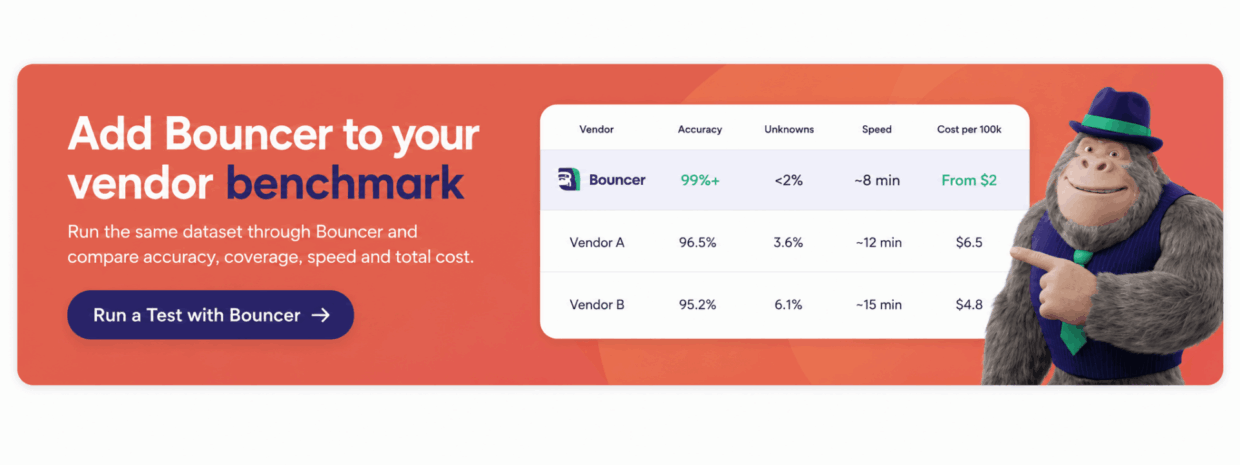
Ready to include Bouncer in your test? Explore Bouncer Email Verification and run your own data through the platform.
FAQ
How do I choose an email verification tool?
Choose an email verification provider by defining your use case and non-negotiable requirements first. Then compare shortlisted vendors on accuracy, catch-all handling, bulk capacity, API behaviour, integrations, security, reliability and total cost. Test the strongest providers on the same representative dataset before making a final decision.
What is the most important feature of an email verification tool?
Verification quality is usually the most important criterion, but it shouldn’t be reduced to one accuracy percentage. Compare false-valid results, false-invalid results, unknown rates, catch-all handling and the amount of actionable information returned with each result.
How accurate should an email verification tool be?
Higher accuracy is preferable when the methodology behind the number is clear. Ask what data was tested, how unknown results were treated and how often the system incorrectly accepts bad addresses or rejects working ones. Your own controlled test is usually more valuable than comparing headline percentages alone.


