





Then someone suggests enrichment, and the room gets quiet because privacy rules enter the chat. That is why data enrichment for gdpr and ccpa compliance needs a careful workflow. Better data can improve campaigns, but only when teams respect purpose, transparency, consent, deletion rights, and data minimization.
You’ll learn
- What data enrichment means in email marketing and CRM workflows
- How GDPR and CCPA affect enrichment decisions
- Why enrichment is not the same as consent
- How Bouncer supports safer enrichment, verification, and segmentation workflows
- Which data fields are useful and which ones may create unnecessary risk
- How to build an enrichment process that respects privacy requirements
- How to use enriched data without damaging trust or deliverability
What data enrichment means in email workflows
Data enrichment is the process of adding useful context to an existing contact, lead, customer, or company record. In email marketing, that context may include company name, industry, company size, country, job function, business domain, region, technology category, lifecycle stage, or engagement segment.
The goal is usually better segmentation.
A B2B team may want to separate enterprise leads from small businesses. An ecommerce brand may want to identify business buyers, wholesale customers, or international segments. A SaaS company may want to route demo requests based on company profile. A marketing team may want to personalize campaigns based on location or account type.
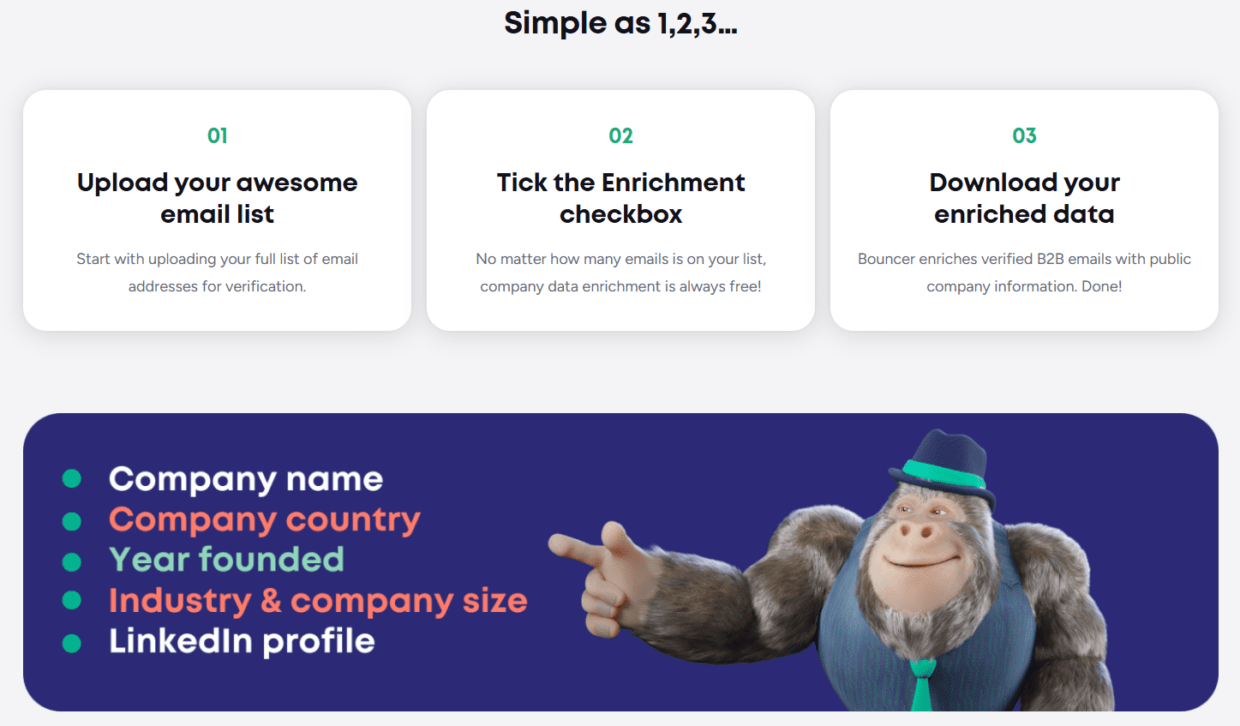
Bouncer’s Company Data Enrichment fits this use case because it enriches customer data with publicly available company information. The workflow starts with an uploaded email list for verification, then adds company context that can support better segmentation.
That distinction matters. Enrichment should not become data hoarding. It should help the team make specific, useful, privacy-conscious decisions.
Data enrichment for gdpr and ccpa compliance is about using enrichment in a way that fits the purpose of the relationship. If someone signs up for a product demo, company-level enrichment may help route the request properly. If someone joins a general newsletter, adding too much personal detail may create unnecessary risk.
Why GDPR and CCPA change the enrichment conversation
GDPR and CCPA do not ban enrichment, but they change how teams should think about it.
Under GDPR, personal data processing must follow principles such as lawfulness, fairness, transparency, purpose limitation, data minimization, accuracy, storage limitation, integrity, and accountability. That means teams should know why they enrich data, what lawful basis applies, which data they add, how they explain it, and how long they keep it.
CCPA gives California residents rights around personal information, including the right to know, delete, correct, and opt out of certain uses. It also pushes businesses to think clearly about categories of data collected, purposes, service providers, and consumer rights processes.
For marketers, RevOps teams, and agencies, the practical message is this: enrichment needs governance.
You cannot treat enrichment as “more fields are always better.” More fields can mean more segmentation options, but they also mean more responsibility. If a field does not improve a specific workflow, it may not belong in the database.
| Privacy principle | What it means for enrichment | Practical action |
| Purpose limitation | Use data for a specific, stated purpose | Define why each enriched field exists |
| Data minimization | Do not collect more than needed | Avoid nice-to-have fields with no campaign use |
| Accuracy | Keep data correct and current | Verify, refresh, and remove stale fields |
| Transparency | Explain relevant data practices | Keep privacy notices clear |
| Storage limitation | Do not keep data forever | Set review or deletion rules |
| Rights handling | Respect access, deletion, correction, and opt-out rights | Connect enrichment data to rights workflows |
| Accountability | Be able to show your process | Document vendors, fields, purposes, and retention |
This table is the core of data enrichment for gdpr and ccpa compliance. It helps teams turn privacy from a vague concern into operational rules.
Data enrichment is not consent
This is the part teams often blur.
Enrichment can add context. It does not create permission.
If a contact has not agreed to receive marketing emails, enrichment does not change that. If someone opts out, enriched company data does not make them contactable again. If a privacy request requires deletion or correction, the enriched fields must be handled along with the rest of the record.
This matters because enriched data can make campaigns feel more targeted. A team may think, “Now we know this lead’s company size and industry, so we can email them.” But the more important question is still: are we allowed to contact them for this purpose?
Email verification has the same boundary. A valid email address does not equal consent. It only tells you that the address appears usable.
Bouncer can help with data quality through Email Verification, bulk email verification, and enrichment. But consent, privacy notices, suppression rules, and legal basis still need to come from your own compliance process.
A safe workflow treats these as separate layers:
| Layer | Main question | Example |
| Consent or lawful basis | Are we allowed to process or email this person? | Newsletter opt-in, legitimate interest assessment |
| Verification | Is the email address usable and safe enough to send? | Valid, invalid, risky, disposable |
| Enrichment | What extra context helps us segment or route? | Company size, industry, region |
| Segmentation | Which campaign or workflow fits this record? | Enterprise nurture, EU audience, trial onboarding |
| Rights handling | Can we delete, correct, or export this data when requested? | CCPA deletion, GDPR access request |
| Retention | How long should this data stay? | Review stale records after set period |
Mixing these layers creates risk. Keeping them separate makes data enrichment more defensible.
How Bouncer fits into a privacy-conscious enrichment workflow
Bouncer can support data enrichment for GDPR and CCPA compliance in a few important ways.
First, Bouncer’s Company Data Enrichment focuses on publicly available company information. This is useful because company-level context can support segmentation without always requiring sensitive personal profiling.
Second, Bouncer starts the enrichment workflow from email verification. This matters because enrichment should not add more information to invalid or poor-quality records. If an email is unusable, enriching the record may create more noise rather than more value.
Third, Bouncer supports GDPR-conscious email verification, which matters for teams working with EU audiences or global databases. If your enrichment workflow touches EU personal data, vendor selection becomes part of compliance hygiene.
Fourth, Bouncer offers Bouncer Shield and Email Verification API to help stop bad data at the point of capture. This reduces the amount of inaccurate data that later needs enrichment, correction, or deletion.
Fifth, Bouncer AutoClean can help connected platforms maintain cleaner records over time. Cleaner records make enrichment more useful because segments depend on accurate base data.
Finally, Toxicity Check and Deliverability Kit support the wider email hygiene workflow. Enrichment may improve segmentation, but list quality and deliverability still decide whether emails reach people safely.
What data should you enrich?
The safest enrichment strategy starts with a clear question: what decision will this field improve?
If a field helps route leads, segment customers, localize campaigns, suppress irrelevant sends, or respect regional privacy requirements, it may have a good reason to exist. If it only feels interesting, think twice.
For many email teams, company-level fields are more useful and less intrusive than highly personal fields.
| Enriched field | Useful for | Privacy-conscious note |
| Company name | Account matching and CRM cleanup | Usually useful in B2B workflows |
| Company domain | Deduplication and account-level segmentation | Keep tied to a clear purpose |
| Industry | Relevant campaign segmentation | Avoid over-personalization |
| Company size | Routing and sales prioritization | Use broad bands where possible |
| Country or region | Compliance and localization | Important for GDPR and CCPA workflows |
| Business category | Personalization and nurture logic | Keep categories practical |
| Public company data | Account context | Check vendor source and purpose |
| Engagement segment | Frequency and reactivation decisions | Based on first-party behavior |
| Consent status | Permission and suppression logic | Must be accurate and auditable |
| Verification status | Deliverability and list hygiene | Update after reverification |
A privacy-conscious enrichment process favors fields that help users receive more relevant, expected communication. It avoids fields that feel creepy, overly personal, or unrelated to the relationship.
What data should you avoid enriching?
Some data creates more risk than value.
Sensitive personal data, inferred traits, personal lifestyle details, private financial signals, political or health-related attributes, and overly granular personal profiling can create serious compliance and trust issues. Even when a field is technically available, that does not mean it belongs in your CRM.
For email marketing, most teams do not need invasive details. They need clean emails, clear consent, useful company context, country or region, engagement history, and a reliable suppression process.
| Data type | Why it is risky | Safer alternative |
| Sensitive personal attributes | Can trigger higher legal and ethical risk | Avoid unless strictly necessary and lawful |
| Highly granular personal profiling | Can feel intrusive and hard to justify | Use broad engagement segments |
| Unverified third-party personal data | May be inaccurate or hard to explain | Use verified first-party or company-level data |
| Data with unclear source | Hard to defend in rights requests | Use vendors with clear data practices |
| Fields with no campaign purpose | Adds storage and compliance burden | Remove or avoid collecting |
| Old enrichment fields | May become inaccurate | Refresh or delete |
| Hidden scoring logic | Hard to explain to users | Keep scoring rules documented |
| Duplicate inferred fields | Adds confusion and inconsistency | Standardize one reliable field |
Data enrichment for gdpr and ccpa compliance should always include restraint. The best database is not the one with the most fields. It is the one with the right fields, clear purpose, and reliable controls.
How to build an enrichment workflow that respects privacy
A practical workflow should be simple enough for marketing, RevOps, sales, and data teams to follow.
Start with the purpose
Before enriching a list, define why the enrichment is needed. For example:
- You want to segment EU and US audiences differently.
- You want to route enterprise demo requests to sales.
- You want to remove invalid records before a campaign.
- You want to personalize a B2B nurture flow by company size.
- You want to clean CRM records before a migration.
If the purpose is vague, pause. “Better data” is not enough.
Verify before enriching
Use Email Verification before enriching large lists. This prevents your team from adding context to invalid, risky, or unusable records.
For ongoing capture, use Email Verification API or Bouncer Shield so bad records do not enter the system in the first place.
Enrich only useful fields
Use enrichment for fields that support routing, segmentation, localization, or compliance. Avoid adding fields that nobody will use.
Store source and timestamp
Keep a record of where the enriched data came from and when it was added. This helps with accuracy, correction requests, audits, and vendor review.
Connect enrichment to rights handling
If someone requests deletion, correction, access, or opt-out, enriched fields should be included in the workflow. Do not let enrichment data sit in disconnected tools.
Review data regularly
Enriched data decays. Company size changes. Regions change. Titles change. Domains change. If a field supports segmentation, it needs refresh rules or expiry logic.
Enrichment workflow table
| Step | Action | Why it matters |
| Define purpose | Document why enrichment is needed | Supports purpose limitation |
| Verify emails | Check list quality before enrichment | Avoids enriching unusable records |
| Choose fields | Select only fields tied to a use case | Supports data minimization |
| Use trusted vendors | Review privacy and data handling | Reduces third-party risk |
| Store source | Keep vendor and timestamp data | Supports accountability |
| Segment carefully | Use enriched data for relevant campaigns | Avoids overreach |
| Respect suppression | Never override opt-outs or deletion | Protects privacy rights |
| Refresh or delete | Review stale enriched data | Supports accuracy and storage limitation |
This workflow works for B2B marketing, SaaS growth, ecommerce segmentation, agencies, and global campaigns.
GDPR considerations for enrichment
GDPR applies when personal data of people in the EU or EEA is processed. An email address can be personal data. Company-level data may also become personal data when linked to an identifiable person.
For enrichment, GDPR raises several practical questions:
- What lawful basis applies?
- Was the person told how their data may be used?
- Is the enriched data necessary for the stated purpose?
- Can the person access, correct, or delete the data?
- How long will the enriched data be stored?
- Can the team prove the process is controlled?
Data minimization is especially important. If you only need region and company size for segmentation, do not enrich ten extra fields because the vendor can provide them.
Accuracy also matters. If your enriched data is wrong, segmentation can become misleading. A contact may receive the wrong regional campaign, sales may route them incorrectly, or a suppression rule may fail.
Bouncer’s GDPR-focused positioning and European privacy context can make it a useful part of an EU-conscious email hygiene workflow. Still, each company needs its own legal and compliance review for enrichment practices.
CCPA considerations for enrichment
CCPA applies to covered businesses handling personal information of California residents. It gives consumers rights such as knowing what personal information is collected, deleting certain personal information, correcting inaccurate personal information, and opting out of certain sharing or sale of personal information.
For enrichment, this means teams should understand what categories of personal information they add, why they add it, who provides it, where it is stored, and how it can be removed or corrected.
If your CRM enriches California contacts with company data, inferred segments, or marketing categories, those fields may need to appear in internal data maps and rights workflows.
CCPA also makes vendor relationships important. If a third party enriches data for your business, you need to understand whether that vendor acts as a service provider, contractor, third party, or another category under your privacy framework.
For marketers, the practical rule is: do not enrich data you cannot explain, access, correct, delete, or suppress when needed.
Data enrichment vs data minimization
At first, enrichment and minimization can feel like opposites. Enrichment adds data. Minimization asks you to limit data.
But they can work together if enrichment is purposeful.
The question is not “can we add this field?” The question is “do we need this field for a clear, legitimate workflow?”
| Enrichment idea | Keep or avoid? | Reason |
| Country or region for compliance segmentation | Keep | Supports legal and campaign routing |
| Company size for B2B sales routing | Keep if used | Clear business purpose |
| Industry for nurture relevance | Keep if campaign logic uses it | Supports segmentation |
| Personal social profiles for all newsletter subscribers | Usually avoid | Often unnecessary for email campaigns |
| Sensitive inferred traits | Avoid | High privacy and trust risk |
| Lead source | Keep | Supports consent and attribution review |
| Verification status | Keep | Supports deliverability hygiene |
| Random vendor-provided personal attributes | Avoid | Hard to justify and maintain |
Data enrichment for gdpr and ccpa compliance works best when every field earns its place.
Enrichment and email verification should work together
Enrichment and verification solve different problems.
Verification checks whether the email address appears usable and safe enough to send. Enrichment adds context around the person, company, or account.
If you enrich without verification, your database may become more detailed but not more usable. You may know the industry of a contact whose email will bounce. You may know the company size of a lead who used a fake address. That does not help sales or marketing.
If you verify without enrichment, your team may have clean emails but weak segmentation. Every contact may be deliverable, but campaigns may still feel generic.
The best workflow combines both.
| Workflow | Result | Best use |
| Verification only | Cleaner sendable list | Campaign prep and bounce reduction |
| Enrichment only | More context but uncertain reachability | Research and account profiling |
| Verification then enrichment | Cleaner data plus useful segmentation | B2B campaigns, SaaS routing, CRM cleanup |
| API validation then enrichment | Cleaner records from entry | Demo forms, signups, product workflows |
| Enrichment plus deliverability checks | Better segmentation and inbox risk review | Large campaigns and global sends |
Bouncer supports this combined workflow through verification, enrichment, API validation, Shield, AutoClean, Toxicity Check, and Deliverability Kit.
Segmentation with enriched data
Enriched data should make segmentation more useful, not more invasive.
Good segmentation helps people receive relevant messages. It can reduce irrelevant sends, improve engagement, and support compliance rules across regions.
Examples:
- EU contacts receive GDPR-aware campaign handling.
- California contacts follow CCPA rights workflows.
- Enterprise accounts receive a different nurture path than small businesses.
- B2B ecommerce buyers receive wholesale content instead of consumer promotions.
- Inactive contacts enter re-engagement only after verification.
- Contacts with invalid or toxic emails stay out of campaigns.
This is where Bouncer’s Company Data Enrichment can help. Company-level enrichment can support segmentation without relying on unnecessary personal profiling.
Using enrichment in global campaigns
Global campaigns need extra care because privacy rules, consent expectations, and regional norms can vary.
A global sender may need to segment based on region, consent source, subscription type, language, lifecycle stage, and verification status. Enrichment can help fill some of these gaps, but it must not override consent or rights requests.
| Global campaign need | Useful data | Privacy note |
| Regional compliance | Country or region | Keep source and update logic clear |
| Language targeting | Locale or language preference | Prefer first-party preference data |
| Consent handling | Consent source and timestamp | Do not infer consent from enrichment |
| Suppression | Opt-out and deletion status | Must override campaign logic |
| Deliverability | Verification and engagement status | Supports cleaner sending |
| Company segmentation | Industry and company size | Use broad, relevant categories |
| Relevance | Product interest or lifecycle stage | Prefer first-party behavior |
| Rights handling | Contact ID and data source | Needed for access, correction, deletion |
Global enrichment should be conservative, documented, and connected to suppression workflows.
Vendor selection checklist
Choosing an enrichment or verification vendor should include privacy and operational checks.
| Question | Why it matters |
| What data does the vendor add? | Helps assess minimization |
| Where does the data come from? | Supports transparency and accountability |
| Is the data publicly available or inferred? | Affects risk and explanation |
| Can fields be deleted or corrected? | Supports rights requests |
| Does the vendor support GDPR-conscious workflows? | Important for EU audiences |
| How is data secured? | Protects customer and lead data |
| Can results sync back to CRM? | Reduces disconnected records |
| Does the vendor verify emails too? | Improves data usability |
| Does it support API workflows? | Helps validate at entry |
| Does it integrate with your stack? | Reduces manual errors |
| Can you document purpose per field? | Supports governance |
| Is pricing clear at scale? | Avoids surprises as lists grow |
Bouncer is especially useful for teams that want enrichment to sit next to email verification and hygiene rather than in a disconnected enrichment-only tool.
How to audit your current enrichment process
Before adding new tools, review what you already do.
Start with your CRM fields. Which fields are enriched? Which are first-party? Which are inferred? Which came from vendors? Which have no clear owner?
Then review usage. If a field does not support segmentation, routing, compliance, reporting, or customer experience, consider removing it.
Check source tracking. If your team cannot say where a field came from, that creates risk. Source and timestamp fields help future reviews.
Review rights workflows. If a contact requests deletion, can your team delete enriched data from every system? If they request correction, can the enriched field be updated? If they opt out, does suppression override all segmentation?
Finally, review stale fields. Enrichment from two years ago may no longer be accurate. Company size, industry, ownership, location, and domain data can change.
Example workflow for a B2B SaaS team
A B2B SaaS company collects demo requests, newsletter signups, and trial users.
The team wants better segmentation, but it also serves EU and California audiences. A privacy-conscious workflow could look like this:
- Use Bouncer Shield or Email Verification API on demo and trial forms.
- Store verification status, source, and timestamp in the CRM.
- Verify existing lists with Bouncer before enrichment.
- Enrich only company-level fields needed for routing: company name, domain, industry, company size, and region.
- Keep consent source, privacy region, and subscription status separate from enrichment fields.
- Use enriched fields to route enterprise accounts and localize campaigns.
- Use suppression rules to override all campaign logic.
- Review enriched fields every six to twelve months.
- Use Deliverability Kit before major sends to check inbox placement and authentication.
This gives the team better segmentation without turning enrichment into uncontrolled data collection.
Key takeaways
- Data enrichment for gdpr and ccpa compliance requires purpose, minimization, transparency, accuracy, and rights handling.
- Enrichment is not consent. A richer profile does not give you permission to email someone.
- Bouncer supports safer workflows through Company Data Enrichment, email verification, Email Verification API, Bouncer Shield, AutoClean, Toxicity Check, Deliverability Kit, and GDPR-focused email verification.
- Company-level enrichment can often support segmentation without excessive personal profiling.
- Teams should enrich only fields that support a clear use case.
- Verification and enrichment work best together: verification checks whether the email is usable, while enrichment adds context for segmentation.
- Global campaigns need clear region, consent, suppression, and source data.
- Privacy-conscious enrichment should connect to access, correction, deletion, and opt-out workflows.
Conclusion
Data enrichment for gdpr and ccpa compliance is not about avoiding enrichment. It is about doing it with discipline.
Better company data can improve segmentation, routing, personalization, and campaign relevance. But teams need to know why each field exists, how it was collected, how it will be used, and how it can be corrected or removed.
Bouncer gives teams a practical way to connect enrichment with email hygiene. You can verify lists, enrich company data, protect forms, validate emails in real time, automate cleaning, review risky contacts, and check deliverability. That makes enrichment more useful because it starts from cleaner, more reliable email data.
Use enrichment to make communication more relevant. Use privacy rules to keep that relevance from turning into overreach.
FAQ
What is data enrichment for gdpr and ccpa compliance?
Data enrichment for gdpr and ccpa compliance means adding useful context to contact or company records while respecting privacy principles, rights, transparency, and purpose limits. It involves choosing only necessary fields, documenting sources, and connecting enriched data to deletion, correction, and opt-out workflows.
Is data enrichment allowed under GDPR?
Data enrichment may be allowed under GDPR if there is a lawful basis, clear purpose, transparency, data minimization, and proper rights handling. Teams should avoid unnecessary fields and keep enriched data accurate, limited, and documented.
Is data enrichment allowed under CCPA?
Data enrichment may be allowed under CCPA, but businesses need to respect consumer rights such as access, deletion, correction, and opt-out where applicable. Teams should know what categories of personal information are enriched and how those fields are handled in rights requests.
Does email verification count as data enrichment?
Email verification is not the same as enrichment. Verification checks whether an email appears valid, deliverable, or risky. Enrichment adds extra context such as company, industry, region, or firmographic details.
How does Bouncer support privacy-conscious enrichment?
Bouncer supports privacy-conscious enrichment through Company Data Enrichment, GDPR-focused email verification, email list verification, Email Verification API, Bouncer Shield, AutoClean, Toxicity Check, Deliverability Kit, and integrations. These tools help teams improve data quality without relying only on manual list cleanup.
What data should marketers avoid enriching?
Marketers should avoid sensitive personal attributes, unnecessary personal profiling, unclear third-party data, and fields with no campaign purpose. Safer enrichment usually focuses on company-level context, region, verification status, consent fields, and engagement segments.
Can enriched data improve email segmentation?
Yes. Enriched data can improve segmentation when it supports relevant, expected communication. For example, company size, industry, country, and lifecycle stage can help create better campaigns. The key is to use only data that supports a clear purpose.
Does enrichment replace consent management?
No. Enrichment does not create consent or permission. Consent, lawful basis, opt-outs, suppression, and rights handling must be managed separately from enrichment data.


