





Typos, temporary email addresses and fake sign-ups lead to junk accounts, failed campaigns and lost trust. WordPress does not check email quality by default, so mistakes like john@gmial.com slip in without warning. Over time, these invalid emails pile up in your database and begin to bounce.
Spam traps, bots filling registration forms and users signing up just for discounts only make it worse. High bounce rates send negative signals to mailbox providers, pushing your messages away from the inbox.
This guide explains how email verification works, why WordPress needs it, and how to choose a solution that scales. You’ll learn the difference between basic validation and real verification, what happens behind the scenes, and how tools like Bouncer help keep only legitimate users on your site.
What is email validation & verification and why WordPress needs it
Email validation is the first step in guarding against mistakes. A validation routine checks whether an address follows the correct format and suggests corrections for obvious typos like john@hotmial.con.
Email validation runs on the front end to catch bad formats and prevent typos before submission. It is like a spell‑checker that looks for a missing @ symbol or a domain that doesn’t exist. However, validation stops there as it doesn’t tell you if someone actually owns the mailbox.
Full verification is more involved.
It extends validation by reaching out to the domain, checking DNS and mail server responses, and pinging the mailbox without sending a message.
This is the difference between glancing at a postcard address and walking to the house to see if anyone answers. Verifying addresses reduces bounces and protects your sender reputation, which improves deliverability.
WordPress core doesn’t run these checks, it lets anything pass. As a result, typos, old domains, fake emails and disposable addresses enter through WordPress forms, checkouts and registration pages.
If users register with throwaway addresses or old accounts and then never verify, your data decays and you risk sending to non‑existent mailboxes.

How the email verification process works behind the scenes
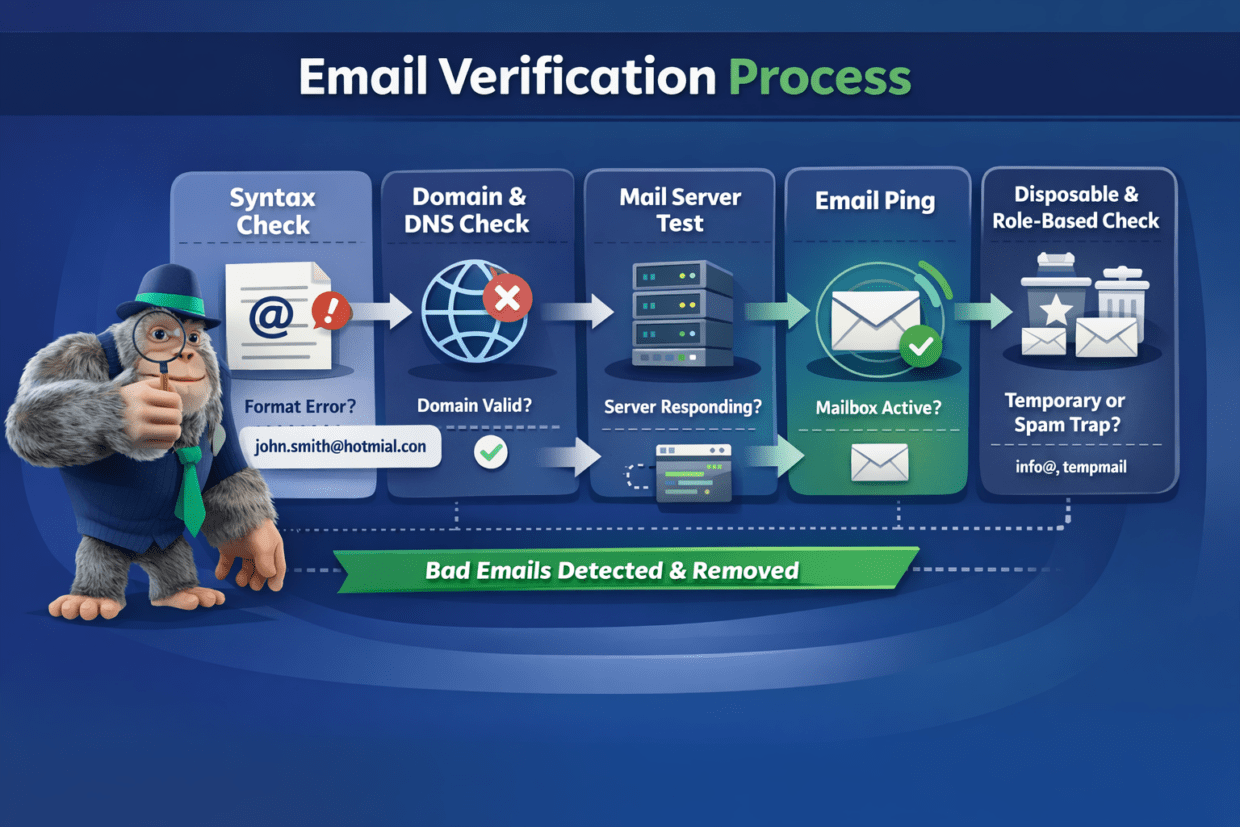
Dedicated verification services perform a sequence of checks before marking an address as safe.
The process breaks down into several steps:
- 1. Syntax check. The system inspects the address for a proper format, looking for a missing @ symbol, illegal characters or strings that are too long. This catches obvious mistakes like john.smith@hotmial.con right away.
- 2. Domain & DNS check. The tool confirms that the domain exists by checking DNS records. No MX records or expired domains mean no mail delivery.
- 3. Mail server test. Next it probes the mail server to see if it’s accepting messages. It connects to the server and performs a handshake without sending a real message. If the server doesn’t respond, the address is flagged.
- 4. Email ping. The system pings the mailbox to confirm that the account exists. Catch‑all domains, which accept any address, are noted as “risky” because a mailbox might not actually be monitored.
- 5. Disposable and role‑based detection. Many services go further to flag temporary email addresses, role‑based inboxes (info@ or support@) and known spam traps. Bouncer, for example, also identifies which addresses are protected by spam filters and which might have full mailboxes.
Combining these layers yields far more reliable results than a simple JavaScript check. A basic WordPress plugin that only verifies syntax can’t tell the difference between user@mailinator.com and user@gmail.com.
A full service can catch disposable addresses that look valid but never deliver. This thorough approach keeps your clean list full of valid emails and removes entries that might harm your reputation.
Choosing the right email verification tool for WordPress
Not all verifiers are equal. When evaluating a solution for your WordPress website, consider accuracy, speed, API access, ease of use and privacy.
High accuracy matters because you don’t want to block real customers. Bouncer’s accuracy is above 99%.
Speed is important for a seamless checkout or sign‑up; an instant email verification check prevents friction.
APIs and native integrations let you run verifications during form submissions, on specific pages, or as part of scheduled clean‑ups.
Privacy is critical if you handle personal data. Bouncer is GDPR compliant by design; email addresses are anonymized within its systems, results can be deleted on demand and data is stored in EU data centers. This reassurance matters if you operate in Europe or serve European visitors. Look for services that maintain compliance and transparency.
Finally, think about the user experience. The tool should have a user friendly interface so site administrators can understand results, run bulk checks and integrate with WordPress forms like Ninja forms or Jetpack forms.
Bouncer’s API supports bulk uploads and real‑time checks, and the dashboard highlights which addresses are disposable, role‑based or unknown. While WordPress offers simple validation add‑ons, dedicated services like Bouncer outperform basic plugins by performing deeper checks and being continuously updated with new detection patterns.
How bad emails hurt your domain reputation
Sending mail to nonexistent addresses signals poor list hygiene. Bounce rate is a critical signal for inbox placement. Spikes in bounces prompt internet service providers (ISPs) to filter future emails or block them entirely.
Elevated bounce rates damage your IP and domain trust, causing more messages to land in spam. Hard bounces, where an address is invalid or closed, are permanent and should trigger removal, while soft bounces may be temporary but still count against you if repeated. Experts recommend keeping bounces below 2%; rates above 5% are a red flag.
Hitting spam traps is even worse. Pristine traps (addresses never used for legitimate communication) and repurposed traps (old addresses turned into traps) are designed to catch senders with poor list hygiene. When your domain hits a trap, mailbox providers flag you as untrustworthy. This can lead to blacklisting and plummeting deliverability. Role‑based addresses like info@ or admin@ may behave as spam traps because no one monitors them. Clearing out such addresses keeps your reputation healthy.
Worst of all, domain reputation sticks around.
Domain reputation is like a credit score; you can’t escape it by switching providers because the reputation follows your domain. Recovery takes time: typical domains need three to six months to recover, while blacklisted domains may need six to twelve months.
That means prevention is easier than repair. Monitoring bounce rates and avoiding fake emails is vital to avoiding long‑term damage.
How email verification helps improve deliverability for WordPress emails
A clean list of email addresses has a direct impact on inbox placement. By verifying addresses before sending, you reduce hard bounces and avoid hitting traps.
Verifying addresses preserves sender reputation and improves deliverability. A cleaned list helps you hit the inbox without fighting spam filters. High‑quality lists also produce better engagement metrics, which ISPs increasingly use as signals. When recipients open, click and reply, your domain looks trustworthy.
Verification benefits all types of messages sent from a WordPress plugin.
For transactional emails (such as order confirmations, invoices or login reminders), you need those messages to reach the right person quickly. A mistyped address leads to missed orders and frustrated customers.
For marketing campaigns, verification protects your domain from being penalized due to high bounce rates.
For membership sites or online courses, verifying addresses ensures that only verified users receive content, keeping your community healthy.
Many WordPress installations use SMTP plugins like WP Mail SMTP to route mail.
High bounce rates make you look spammy and reduced deliverability puts even valid messages at risk. Using a verification tool complements SMTP plugins by filtering out bad addresses before they reach your mail server. This reduces the load on your SMTP service and prevents throttle issues at your hosting provider.
Protecting your WordPress site from fake signups and new users
Bots and fraudsters can create accounts at scale. Relying on CAPTCHAs alone no longer suffices. AI‑powered bots and human fraud farms can solve reCAPTCHA puzzles, so spam still slips through.
CAPTCHAs also do nothing to check whether the submitted data is valid as people can still enter fake names, phone numbers or email addresses. This means a site that uses only CAPTCHA still sees bots clogging its forms and database.
To protect your registration forms and membership areas, use multi‑layered defenses.
We recommend turning on email activation for new account creation; this means an address must be confirmed before the user can log in.
While activation alone doesn’t stop bots from filling forms, it prevents them from gaining access until they verify. Adding custom questions, geolocation filters and manual approval for specific user roles further weeds out fake accounts.
Real‑time verification is the missing piece.
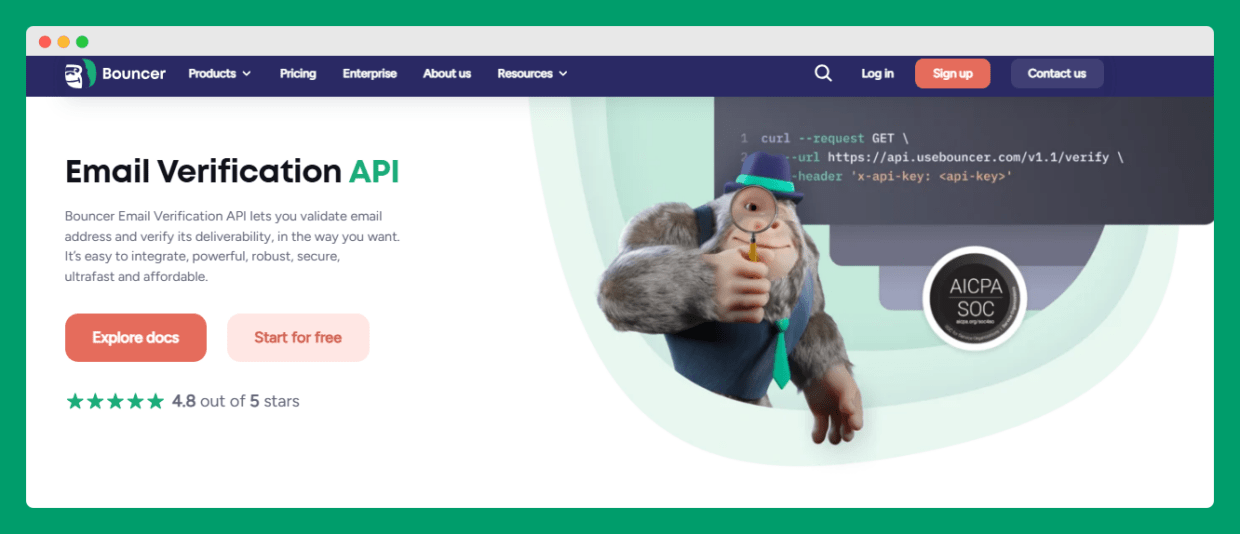
By connecting your forms to an API such as Bouncer’s, you can validate emails as soon as a user clicks Submit. Bouncer’s tool pings the mailbox and flags disposable addresses or those protected by spam filters. If a sign‑up uses asdf123@email.com, the form can block the submission. This helps keep only legitimate users and real customers, which is essential for membership sites, online courses and community portals.
Customize error messages for a better user experience
When an email is rejected, the message you show can determine whether someone tries again or abandons the form.
WordPress’s default messages are vague and can confuse visitors. Use clear, helpful feedback, such as “Did you mean gmail.com?” instead of “Invalid email format”. Small hints help users correct typos without revealing system logic. A progress indicator for multi‑step forms and pre‑filled fields can also reduce frustration.
Modern form builders such as WPForms include plugin features that suggest corrections for common domains and integrate with third‑party verifiers. This way your contact form can gently guide visitors to fix mistakes. Keeping your forms welcoming encourages legitimate signups and reduces support requests.
Gaining full control over email quality in WordPress
Managing email quality isn’t a one‑time task. You need to check addresses at multiple points:
- when someone fills a contact form or signs up,
- when they log in again after months of inactivity,
- and when you run bulk marketing campaigns.
Start by auditing where your site collects emails: registration forms, checkout pages, newsletter signups and support pages. Use basic JavaScript validation to catch obvious errors, but back it up with server‑side verification and an API for real time email verification.
At the user registration level, adopt double opt‑in. Send a confirmation link and only activate the account after the user clicks it.
Remove inactive users who never verify or who haven’t engaged in months.
For your database, schedule periodic clean‑ups using your verification service’s bulk tools. We suggest watching bounce rates closely and cleaning older segments before each campaign. You can also use the API to flag addresses as risky or unknown and keep them in a separate segment. Automating these tasks frees you from manual list maintenance and helps you avoid spam complaints.
External verification services bring added security and accuracy that most plugins can’t match. Many can integrate with Ninja forms, Jetpack forms or other builders via webhooks or API keys.
When evaluating such services, look for regular updates and new features so the tool stays ahead of evolving threats and disposable services. A reliable verifier gives you confidence that your list contains only verified users and prevents your site from becoming a farm for bots.
Using Bouncer with WordPress forms, stores, and email lists
Bouncer illustrates how a dedicated tool fits into common WordPress workflows.
On a contact form, you can call the API to check the submitted address before saving the entry. The service checks format, domain status and mailbox existence in milliseconds, then returns a verdict.
If the address is risky, you can ask the visitor to try another address. This prevents invalid leads from entering your CRM and helps eliminate spam. The tool’s dashboard shows a breakdown of safe, risky and undeliverable addresses, making it easy to manage your email list.
For WooCommerce checkout pages, verification protects revenue. Customers often mistype their email when paying; verifying addresses in real time means you don’t lose contact with them. In case of digital products, verifying the address is the only way to deliver the download.
By using Bouncer’s API, you can block temporary inboxes from making purchases and keep your list of valid emails. Many site owners also integrate Bouncer with membership plug‑ins, so that users register with working addresses and avoid future login issues.
Bulk list maintenance is equally important. If you’ve been collecting emails for years, your list likely contains old or inactive users, throwaway addresses and perhaps role‑based inboxes. Bouncer’s bulk verification lets you upload a CSV and get a report that flags fake emails, duplicates and spam traps.
You can then purge these records and run a re‑engagement campaign to win back engaged customers. Combining bulk cleanup with real time email verification keeps both new and existing data healthy.
Because Bouncer is designed around privacy, it suits GDPR‑conscious businesses. Uploaded addresses are anonymized and you can delete results on demand. Its servers are in the EU and the company is transparent about data handling, giving peace of mind when working with European subscribers.
Final thoughts
Email verification is not a one-time fix. Lists decay as people change jobs, abandon inboxes or use throwaway addresses. Without regular checks, bounce rates rise and domain reputation suffers.
A steady process that combines front-end validation, real-time verification, double opt-in and periodic clean-ups keeps your data reliable. Bloggers, store owners and agencies all benefit from knowing their messages reach real people.
If you rely on basic plugins or CAPTCHA alone, you’re leaving gaps open. Dedicated tools go further by spotting disposable addresses, spam traps and risky inboxes before they cause damage.
Bouncer helps WordPress sites stay clean, compliant and deliverable. Verify emails in real time, clean existing lists, and protect your domain reputation.
👉 Try Bouncer for free and take control of email quality today.


