





A regex can tell you whether an email address looks right. It cannot tell you whether the domain can receive mail, whether the mailbox appears reachable or whether the address uses a disposable provider.
For those checks, a Node.js application needs an email verification API.
Bouncer supports real-time verification for individual addresses and batch workflows for larger datasets. In this guide, we will call the real-time API from Node.js, read the result and turn it into application logic.
What you need before you start
The examples below assume:
- – Node.js 18 or newer
- – a Bouncer account
- – a Bouncer API key
- – a server-side Node.js application
Keep the API key on the server. Bouncer accepts the API key in the request header, so it should never sit in browser-side JavaScript.
Store it as an environment variable:
BOUNCER_API_KEY=your_api_keyThen read it in Node.js:
process.env.BOUNCER_API_KEYIf you are new to Bouncer API setup, this is the current three-step flow inside the app:
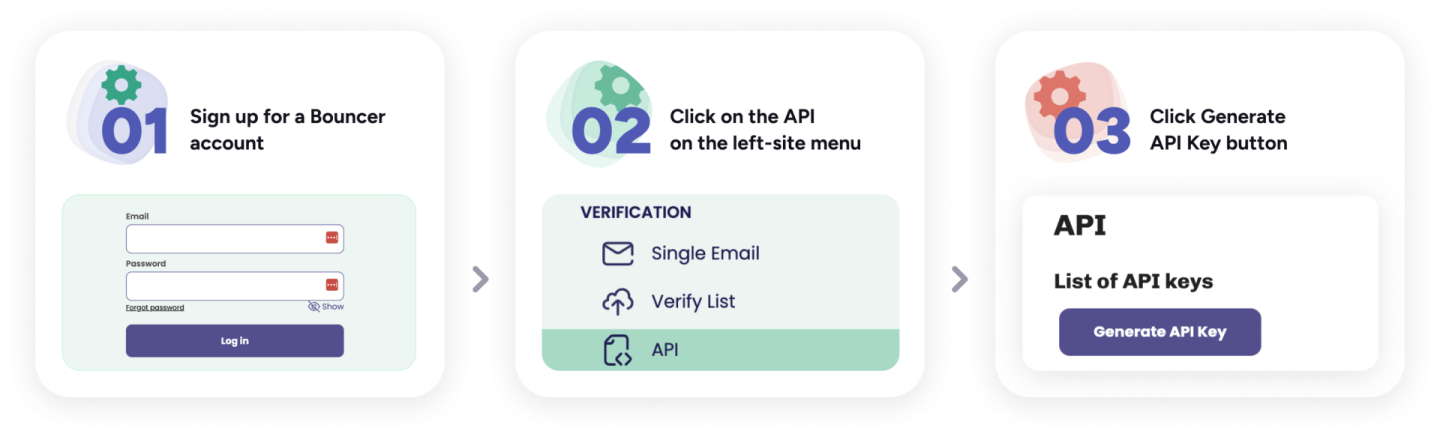
You can also read the broader email verification API best practices before wiring verification into a production flow.
Make your first verification request in Node.js
Bouncer’s real-time endpoint accepts an email address and returns verification data your application can act on.
Node.js 18+ includes fetch(), so you do not need Axios for a basic integration.
const API_URL = 'https://api.usebouncer.com/v1/email/verify';

async function verifyEmail(email) {
  const url = new URL(API_URL);

  url.searchParams.set('email', email);
  url.searchParams.set('timeout', '10');

  const response = await fetch(url, {
    method: 'GET',
    headers: {
      'x-api-key': process.env.BOUNCER_API_KEY
    }
  });

  if (!response.ok) {
    throw new Error(`Bouncer API returned ${response.status}`);
  }

  const payload = await response.json();

  return Array.isArray(payload) ? payload[0] : payload;
}
Call the function like this:
const result = await verifyEmail('john@example.com');

console.log(result);
The API returns more than a yes/no verdict. Bouncer can return a status, reason and extra information about the domain or account.
That richer output is useful when your application needs a different policy for a disposable address, a catch-all domain or a temporary infrastructure problem.
Understand the result before acting on it
Bouncer uses four broad result groups:
- –
deliverable - –
risky - –
undeliverable - –
unknown
Do not flatten these into true and false.
A deliverable address passed the verification checks.
An undeliverable address should usually trigger a correction or suppression rule.
Risky is different. It can include addresses where sending is possible but confidence is lower.
Unknown is also different. It tells you that the receiving infrastructure did not give a conclusive answer.
The Bouncer FAQ goes deeper into statuses and reason codes. The main email verification page also shows how Bouncer presents deliverable, risky, undeliverable and unknown results to users.
Turn Bouncer statuses into application decisions
Create your own policy layer instead of scattering API-specific logic across routes.
function getVerificationDecision(result) {
  switch (result.status) {
    case 'deliverable':
      return { action: 'accept', message: 'Email accepted' };
    case 'undeliverable':
      return { action: 'reject', message: 'Please check your email address' };
    case 'risky':
      return { action: 'review', message: 'Email accepted with a risk flag' };
    case 'unknown':
      return { action: 'retry_later', message: 'Verification was inconclusive' };
    default:
      return { action: 'review', message: 'Unexpected verification result' };
  }
}
This keeps product rules under your control.
A newsletter signup can accept more uncertainty than a flow where the email address is used for account recovery. Your application should decide what risky and unknown mean in context.
Use the reason field too
The broad status is useful, but the reason gives you more context.
function shouldAskForAnotherEmail(result) {
  return (
    result.status === 'undeliverable' &&
    ['invalid_email', 'invalid_domain', 'rejected_email'].includes(result.reason)
  );
}
This creates a better user experience than showing the same error for every non-deliverable result.
A typo or invalid domain is different from a mail server that temporarily refuses to answer.
Bouncer also exposes richer verification output:
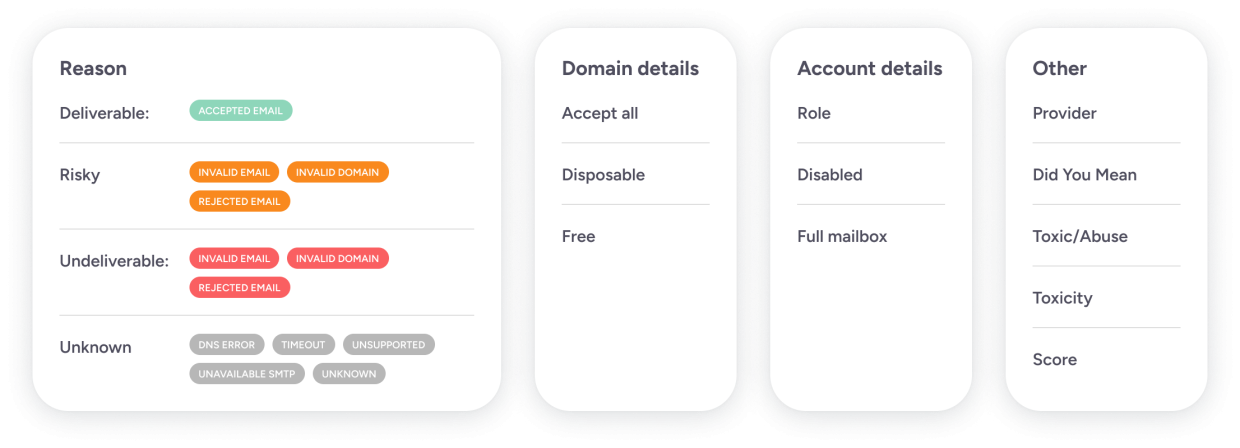
If your flow depends on specific flags, store the original result instead of keeping only one boolean.
Build a reusable Node.js client
For a larger application, move verification into its own module.
export class BouncerClient {
  constructor(apiKey) {
    this.apiKey = apiKey;
    this.baseUrl = 'https://api.usebouncer.com/v1/email/verify';
  }

  async verify(email, timeout = 10) {
    const url = new URL(this.baseUrl);

    url.searchParams.set('email', email);
    url.searchParams.set(
      'timeout',
      String(Math.min(Math.max(timeout, 1), 30))
    );

    const response = await fetch(url, {
      headers: {
        'x-api-key': this.apiKey
      }
    });

    if (!response.ok) {
      throw new Error(
        `Verification request failed: ${response.status}`
      );
    }

    const payload = await response.json();

    return Array.isArray(payload)
      ? payload[0]
      : payload;
  }
}
Then initialize the client once:
const bouncer = new BouncerClient(
  process.env.BOUNCER_API_KEY
);

const result = await bouncer.verify(
  'john@example.com'
);
This keeps API calls away from controllers, form handlers and unrelated business logic.
Add verification to an Express signup endpoint
app.post('/signup', async (req, res) => {
  const { email } = req.body;

  try {
    const result = await bouncer.verify(email);
    const decision = getVerificationDecision(result);

    if (decision.action === 'reject') {
      return res.status(400).json({
        error: 'Please check your email address',
        reason: result.reason
      });
    }

    const user = await createUser({
      email,
      emailVerificationStatus: result.status,
      emailVerificationReason: result.reason
    });

    return res.status(201).json({
      id: user.id
    });
  } catch (error) {
    return res.status(503).json({
      error: 'Email verification is temporarily unavailable'
    });
  }
});
In production, decide what happens when the verification service itself cannot answer.
Blocking every signup during a temporary network problem may be too strict. Another option is to accept the account, flag the email and retry verification in the background.
For more patterns around point-of-entry checks, see Bouncer’s guide to real-time email validation.
Handle API failures separately from verification results
These are not the same thing:
- – API returns
unknown - – request times out
- – authentication fails
- – server returns a 5xx response
- – network connection fails
- – payload is malformed
Retries can make sense for selected transient failures.
They do not make sense for every 4xx response, bad authentication or an address that was already verified as undeliverable.
Keep a retry cap. Add backoff. Log enough information to debug the problem without leaking the API key or unnecessary personal data.
Real-time or batch verification?
Use real-time verification when someone is waiting for a decision:
- – registration
- – checkout
- – lead form
- – invitation
- – contact creation
Use batch verification when you are processing data in the background:
- – CRM imports
- – campaign preparation
- – scheduled database hygiene
- – migrations
- – old lead lists
For larger jobs, read how to verify email addresses in bulk instead of spawning thousands of single-address requests.
If you are comparing the API design against other verification products, Bouncer also has an email verification buyer's guide.
Node.js production checklist
Before shipping:
- – keep the API key server-side
- – set request timeouts
- – log API failures separately from verification statuses
- – retain status and reason where useful
- – define what
riskydoes in your product - – define what happens after
unknown - – cap retries
- – monitor rate-limit responses
- – send high-volume work to Batch API
- – do not treat regex as mailbox verification
FAQ
Can Node.js verify whether an email mailbox exists?
Node.js can validate syntax locally, but mailbox-level verification needs signals from mail infrastructure. An email verification API handles those checks and returns a result your application can use.
Is regex enough for email verification in Node.js?
No. Regex can catch formatting mistakes. It cannot confirm domain mail routing, mailbox responses, catch-all behavior or disposable-provider signals.
Should I verify emails in frontend JavaScript?
Keep Bouncer API calls on the server so the API key is not exposed in the browser.
Should I reject every risky email?
No. Risky is not the same as undeliverable. Map it to a policy that fits your signup, lead or sending workflow.
When should Node.js use Batch API?
Use batch verification for imports, CRM cleanup, campaign preparation or other jobs involving large datasets. Keep the real-time endpoint for flows where a user is waiting for an immediate result.
Final thought
The HTTP call is the easy part.
The stronger Node.js implementation keeps verification behind a small client, preserves Bouncer’s status and reason data and gives the product its own decision layer.
Real-time checks belong in real-time flows. Once the job becomes a large data-processing task, move it to Bouncer’s batch workflow.
—


