





An old mailing list usually contains several different problems at once. Some addresses are invalid. Some are still deliverable but belong to people who have not engaged for years. Some contacts were imported from sources nobody remembers. Some have unsubscribed in another system. Some are role accounts or catch-all addresses that need a different rule.
That is why “list cleaning” is better treated as a small tool stack than a single button.
The cleanup stack
| Job | Tool/process | When to use it |
|---|---|---|
| Address quality | Bouncer verification | Before rebuilding the audience |
| Large-file cleanup | Bulk verification | CRM exports and migrations |
| Risk screening | Toxicity Check | Old, cold, or mixed-source records |
| Suppression | CRM/ESP rules | Before every campaign |
| Recurring decay | AutoClean | Lists used repeatedly |
| Sender readiness | Deliverability Kit | Before large reactivation |
First question: where did the list come from?
Age alone does not tell you enough. A two-year-old customer list with clear first-party history is different from a six-month-old purchased file. Before verification, separate the database by source.
- newsletter signup
- customer or product account
- event or webinar
- partner import
- sales research
- vendor list
- unknown legacy source
Unknown-source records deserve a lower trust level from the start. Verification can tell you something about the address. It cannot recreate permission or provenance that was never stored.
Verify before enrichment or segmentation
An old database often looks incomplete, so teams are tempted to enrich it first. That can waste effort by adding company or profile data to addresses that should never return to campaigns.
Use email verification first. Suppress invalid records and prior failures. Review unknown and catch-all results according to campaign risk. Only then spend time on enrichment or detailed segmentation.
Bulk verification for the base file
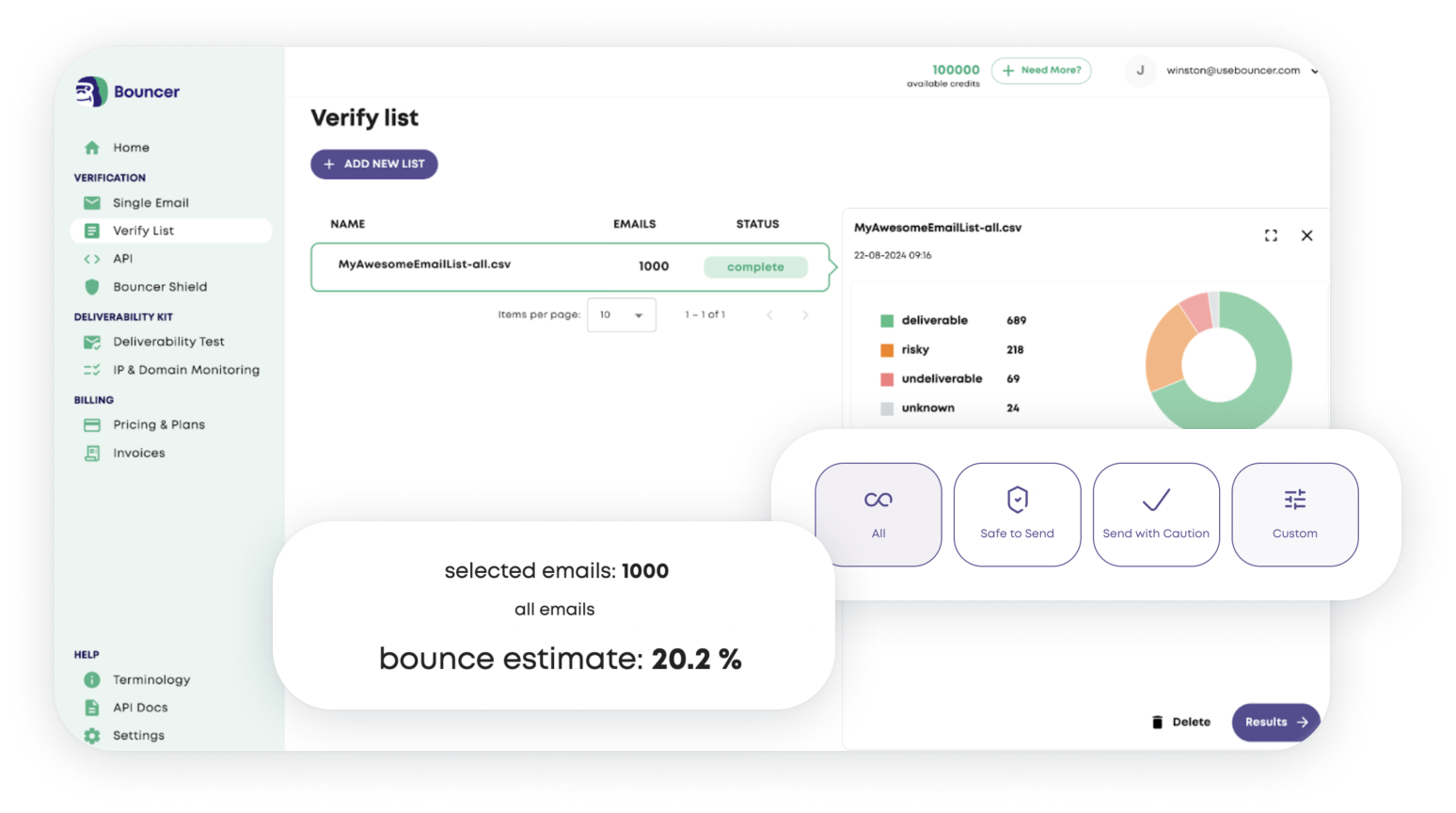
Bulk email verification is the practical route for a large export. Preserve the CRM record ID, source, and last-engagement date in the file so results can be mapped back cleanly.
Do not create a “clean-list-final-v7.csv” that becomes disconnected from the source system. The value comes from updating the record that marketing or sales will use next month.
Use Toxicity Check when provenance is weak
If the database includes partner data, purchased records, cold outreach files, or unknown-source contacts, a binary verification result may be too optimistic. Toxicity Check adds another risk signal for potentially harmful records.
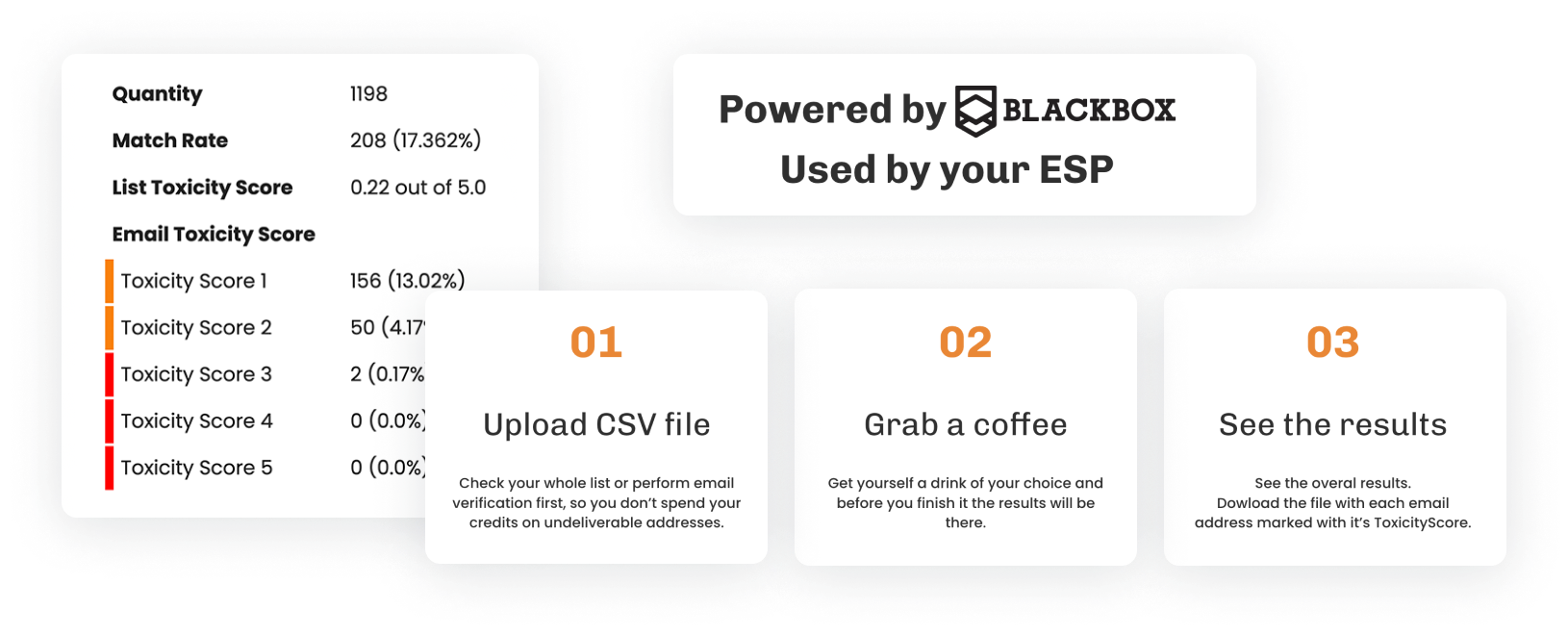
Still, the source should win. A questionable file does not become a good marketing asset because many rows appear deliverable.
Rebuild suppression before you count the audience
Teams often ask “How many contacts are left?” too early. First make sure prior bounces, complaints, unsubscribes, do-not-contact records, and privacy restrictions are applied consistently.
Suppression should override verification, enrichment, and engagement. A perfect company match does not make an unsubscribed contact eligible.
Split the list by recency
| Recency | How I would treat it |
|---|---|
| Recently active | Normal hygiene rules |
| Inactive 3–6 months | Verify if source or quality is uncertain |
| Inactive 6–12 months | Verify before reactivation |
| Inactive 12–24 months | Higher caution and smaller test sends |
| Very old / no source | Strong review; often not worth reactivating |
There is no universal age at which every address becomes unusable. The combination of age, source, prior engagement, and business relationship matters more.
Do not treat catch-all addresses as invalid
Catch-all domains accept mail broadly, which makes mailbox-level verification less certain. They are common in B2B and should usually move into a separate rule rather than being deleted automatically.
For a high-volume reactivation, hold uncertain catch-all records until the lower-risk audience performs well. For a small account-based list with manual research, you may accept more uncertainty.
Cold lists need a different standard
If the old file is primarily outbound prospecting data, use the dedicated workflow for cleaning a cold email list before a campaign. Cold data carries different expectations, sources, and complaint risk from an opt-in newsletter database.
Check sender readiness before the comeback campaign
A clean audience does not guarantee a healthy sender. Before a major reactivation, use Deliverability Kit to check inbox placement, blocklists, SPF, DKIM, and DMARC.
This matters especially when the sender has been quiet for months or the reactivation audience will create a large volume jump.
Use a test cohort instead of sending the whole cleaned list
Verification removes obvious address-level problems. It cannot tell you how an old audience will respond to a campaign they have not seen in a long time.
Start with the most recent, best-sourced cohort. Measure bounces, complaints, unsubscribes, and provider placement. Expand only when the first group behaves as expected.
Prevent the next cleanup project
Once the list is usable again, keep source, verification date, and suppression reason inside the CRM. For recurring databases, AutoClean can reduce manual re-verification work.

Cleanup checklist
- preserve record IDs and source
- apply suppression before verification results are used
- verify old and uncertain contacts
- review risk on questionable sources
- segment by recency
- treat catch-all and unknown separately
- test a low-risk cohort first
- store the result back in the CRM
Example: a five-year newsletter database
Imagine a database with 180,000 contacts. The most recent 45,000 have clear signup sources and recent engagement. Another 60,000 are old customers. The rest came from events, imports, and legacy systems.
Cleaning all 180,000 as one audience hides the real decision. The team should preserve the source buckets, verify the higher-risk cohorts, rebuild suppression, and test the most recent inactive group first. The very oldest unknown-source contacts may never justify the risk or cost of reactivation.
The successful outcome is not “we saved 150,000 addresses.” It is “we know which records are usable, which are eligible, and which should stay out of campaigns.”
Create a sunset rule after the cleanup
Old-list projects repeat when there is no rule for future inactivity. Decide when a contact moves from normal sending to reactivation, when verification should be refreshed, and when the record should leave promotional campaigns entirely.
The rule can vary by business model. A B2B company with long buying cycles may keep records longer than a high-frequency ecommerce newsletter. The important part is having a rule before the next database ages.
Decide what you will not try to save
Old-list projects become expensive when the team treats every row as an asset that must be recovered. Some records have no source, no recent activity, no clear business relationship, and uncertain verification results. Keeping them can cost more in review and sender risk than they are worth.
Create a discard rule before cleanup starts. For example, unknown-source records older than a defined period may be excluded automatically unless they map to an active customer or account. The rule should fit the business, but it should exist.
Keep the original list as an audit reference
Do not overwrite the only copy of the source file. Preserve the original export, the verification date, and the rules used to create the sendable segment. That makes later questions easier to answer and prevents “cleaned” files from becoming mysterious new sources themselves.
Use the cleanup to simplify the CRM
An old-list project is a good moment to remove obsolete tags, duplicate source labels, and campaign fields that nobody uses. Do not turn verification into a giant CRM redesign, but clean enough metadata that future teams can distinguish source, status, and eligibility without reading a spreadsheet legend.
A smaller, understandable database is usually more useful than a larger one filled with uncertain records and historical clutter.
FAQ
Should I delete every inactive subscriber?
No. Inactivity is a campaign-strategy signal, not the same as invalidity. Use age, source, engagement, and verification together.
How old is too old for an email list?
There is no universal cutoff. Risk rises when the contact is old, source history is weak, and the address has not been reverified.
Should I enrich an old list before verification?
Usually no when email sending is the goal. Verify first so you do not spend time enriching records that should be suppressed.


