





You don’t get to operate at such an impressively high-level of business without a lot of hard work and meticulous operation.
What its users don’t understand (and why would they? They really don’t need to, after all), is how many regulations contain the practices of the email services, and how much responsibility they hold for the health of email operation from ISP to ISP.
That brings us to today’s topic. We’re looking into one of the Mailchimp means of protection; protection for both parties involved in the process. So, with no further ado—what is the MailChimp Omnivore warning? And how does it affect its users?
TL;DR
- Mailchimp’s Omnivore warning appears when your audience contains risky emails — stale, invalid, role-based, disposable, or possible spam traps — and Mailchimp blocks the campaign to protect deliverability.
- You can’t see which contacts triggered it, so fixing it manually is slow and unreliable. The only real solution is cleaning your list and removing risky addresses.
- Bouncer can fix things fast, by identifying invalid, spam-trap, and broken emails instantly, helping you clear the warning and send campaigns safely.
What is Mailchimp’s Omnivore?
Mailchimp’s Omnivore is a service in their product that scans each new email you add to your mailing lists. Omnivore goes through the lists and identifies potentially bad emails, such as those that are inaccurate, have typos, outdated, or are potential spam traps.
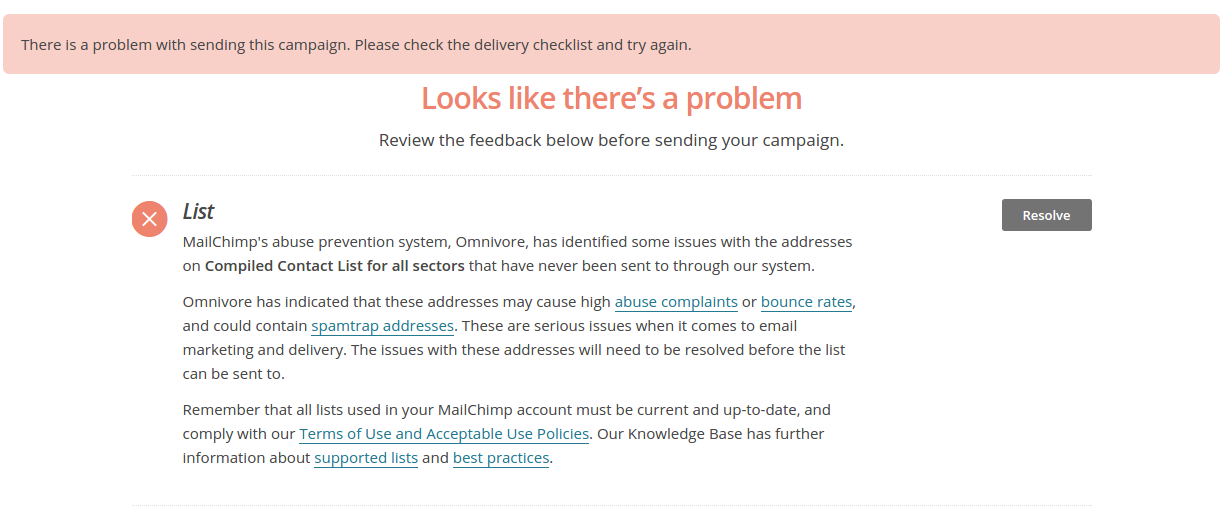
The reason why Mailchimp does this is to prevent you from sending out emails that result in hard bounces. If you have a list of bad addresses, Omnivore will give you a warning and prevent you from sending to that email list.
The problem with Omnivore is that you’ll get a warning but you won’t know which specific email addresses are a problem. So, you have a hurdle for your email campaigns until you resolve the warning.
Naturally, you want to remove this warning. To do that, you need to remove these bad email addresses first and have a spotless email address list.
The first step is to get a list of valid emails with a service such as Bouncer.
With our tool, you can decrease your level of risk and completely eliminate the Omnivore warning. Just upload your lists to Bouncer, and it will show you invalid emails, spam trap emails, misspelled emails, and all other broken email types.
But first, let’s find out why Omnivore is used in the first place.

How Omnivore protects Mailchimp servers and your sender reputation
Omnivore wasn’t created to frustrate Mailchimp users. Its real role is to protect the entire email delivery ecosystem that Mailchimp operates within.
Mailchimp runs on shared sending infrastructure. If that infrastructure starts generating high bounce rates, spam complaints, or spam trap hits, internet service providers can downgrade or block Mailchimp’s servers. When that happens, every sender on the platform feels the impact — even those who follow best practices.
Abuse complaints don’t stop at the individual sender level. They also reflect on Mailchimp as the sending service. If too many risky campaigns go out, Mailchimp’s IPs and domains can lose trust with inbox providers.
That’s where Omnivore comes in.
By scanning new and risky audiences before emails are sent, Omnivore helps stop campaigns that could damage deliverability. This protects Mailchimp’s servers, but it also protects customer domains. When risky addresses are removed early, more legitimate messages reach real inboxes instead of bouncing or triggering complaints.
There’s another upside. As overall list quality improves across the platform, Mailchimp’s infrastructure earns stronger sender scores with ISPs. Inbox providers prefer reliable, low-risk senders. That preference translates into higher inbox placement rates for everyone using the platform.
The Omnivore warning acts as an early alert. It signals that something in the audience needs attention before real damage occurs. When users clean or reconfirm their lists, bounce rates drop, complaint rates fall, and campaign performance improves.
In the end, the outcome is shared.
Better lists for users.
Healthier servers for Mailchimp.
Cleaner signals for inbox providers.
That balance is exactly why Omnivore exists.
What triggers an Omnivore warning?
An Omnivore warning is triggered when Mailchimp detects that part of your audience is likely to cause serious deliverability problems. Omnivore is Mailchimp’s abuse-prevention system, and its job is to stop risky emails from being sent before they harm sender reputation.
The trigger is not a single bad email address. It’s a pattern of risk inside a group of contacts.
Here’s how it happens.
Each time you import new contacts or send a campaign to people you haven’t emailed through Mailchimp before, Omnivore automatically scans those addresses. It focuses on contacts that are new to your account, not ones with an established sending history.
The system then predicts how that group of emails is likely to behave if you send to them. Omnivore looks for signs that suggest:
- A high bounce rate
- A high risk of abuse complaints
- Possible spam trap addresses
Spam traps are especially important here. These are addresses that do not belong to real, active subscribers. Some are old and abandoned. Others exist only to identify senders who use poor list collection or management practices. Sending to them is a strong negative signal.
Omnivore uses an internal algorithm to assign a risk level to the audience. If the predicted risk is too high, Mailchimp automatically places a hold on sending to that audience. This happens before any email is actually delivered.
A few common situations trigger Omnivore warnings:
- Importing a new list that hasn’t been verified or reconfirmed
- Uploading old or inactive contacts that haven’t received emails in a long time
- Sending to a segment that was excluded from previous campaigns and has no recent engagement history
- Using contacts collected outside Mailchimp without proper permission or confirmation
- Poor list hygiene, where invalid, disposable, or abandoned addresses were never removed
One important thing to understand is that Omnivore does not show you which exact email addresses are risky. It works at the audience or segment level. That’s why the warning can feel vague or frustrating. The system is designed to prevent damage, not diagnose individual emails.
When Omnivore is triggered, your audience is not deleted. You simply can’t send to that group until the risky addresses are removed or reconfirmed. Other audiences in your account remain unaffected.
In short, an Omnivore warning is triggered when Mailchimp predicts that sending to a specific group of contacts could lead to bounces, complaints, or spam trap hits. It’s a protective measure. And it almost always points back to how the contacts were collected, imported, or maintained over time.
4 ways to fix an Omnivore warning
If you’re looking into ways of getting around Mailchimp Omnivore warnings by sorting your list manually, then you need to be diligent and practice good email list hygiene.
It could mean multiple passes, cleaning your list, and re-importing it to your email marketing tools to find out if you’ve tracked down all, or enough of, your problem addresses.
If your latest list version does make the grade, you should be aware that the next time you add to it, there may be items still in there that will add to your new score. Keeping a clean list by manual means is a tall order, especially with longer lists.
Here are a few suggestions on how to clean an email list for Mailchimp, and readdress your Omnivore warning.
Remove syntax errors
If you’re going to do the work manually, then obvious errors in email addresses are extra spaces that appear between letters or symbols, additional or missing periods, typos, or unpermitted characters before the @ symbol.
These types of errors are bad syntax and they’re often basic human errors. Unfortunately, bad email syntax can be challenging to spot. You need to manually check your addresses for your email marketing campaigns… Or you can use Bouncer and find invalid addresses in minutes.
Delete role-based addresses
Mailchimp doesn’t like role-based emails as they’re often used to deliver to a department or a group of recipients as opposed to one specific targeted person. While they are legitimate accounts, this means they’re less likely to have been acquired by organic means.
Email addresses with support@, admin@, and especially noreply@ are all role-based emails associated with spam complaints, high bounce rates, and poor email deliverability.
Get rid of bought-in addresses
We can’t stress this enough—bought-in databases are bad news. It might look like you’re acquiring thousands of new leads, but more realistically, you’re acquiring unfamiliar email addresses and an abundance of soft and hard bounces.
The best way to obtain relevant leads is to collect them legitimately. Only that way can you guarantee the recipient is already interested in what you have to offer.
More often than not, these lists are full of spam traps and out-of-date email addresses.
Reconfirm possible stale addresses
A healthy method of making sure your emails are current and relevant is to reconfirm as many as possible. Wherever you can, give your customers, and genuine leads an opportunity to renew their interest so you can avoid any unnecessary bounces.
For example, you can ask subscribers from previous campaigns if they want to stay on your list every few months or so. This type of reconfirmation email takes only a few minutes to set up and can significantly improve your email marketing efforts.
Bouncer, your #1 method for eliminating the Omnivore warning
Bouncer’s tool provides an incredibly simple and efficient, fully automated, Mailchimp Omnivore fix.

Bouncer improves email deliverability and protects your sender reputation. It decreases bounce rates and helps prevent you from being blocked by your ESPs.
Even better, you can connect your Mailchimp account directly to Bouncer to validate your email lists. All you need to connect Bouncer to your Mailchimp account is your Mailchimp credentials.
Those who prefer can generate a Mailchimp API Key, created within Mailchimp and imported into Bouncer. It gives you all the control you could ask for and seamless integration.
How to fix the Omnivore warning? Mailchimp doesn’t want to stop you from delivering your campaigns; quite the contrary, it needs you to. And that’s why Bouncer is here to help everyone get what they need with email verification that works every time.
Are you ready to get started? Sign up for your free trial of Bouncer today!
Frequently asked questions
How do I fix the Mailchimp Omnivore warning?
The easiest fix is to add the list that is giving you problems to Bouncer and verify it. Bouncer will tell you which email addresses are causing the warning so you can remove them and try sending the campaign again.
Can Mailchimp suspend my account?
After repeated violations, yes. However, it will most likely not happen because of Omnivore, as it prevents you from sending campaigns in the first place.
Is there a way to get around the Omnivore warning without cleaning up my list?
No, not really. Mailchimp won’t let you send to an unknown audience without checking the accounts first. You have to verify and clean up your lists first.


